 aws-analyzer · opensearch.py
Look inside your OpenSearch vector indexes from a SageMaker notebook
Install it in your notebook and see what your vector indexes hold: each vector field in plain English, whether its graphs fit in the memory the nodes have, documents that have no vector, vectors that repeat or are all zeros, and the documents nearest a question, without leaving Jupyter.
- One install, boto3 only
- Read-only: reads and searches, never writes
- Domains and Serverless collections
- Plain text outside Jupyter
Every example uses vectors-prod, an OpenSearch Service domain holding support-docs, the help-center articles a support assistant retrieves from, and kb-support, the Serverless collection behind a Bedrock knowledge base. Use your own names. The screenshots are real output from the tool, run against a simulated OpenSearch with synthetic data.
Set up in SageMaker
-
Install the package, in a notebook cell:
%pip install aws-analyzerNo internet in the notebook (VPC-only mode)? On a computer that has internet, download the package and copy it to a bucket the notebook can read (
pip download aws-analyzer --no-deps -d wheels, thenaws s3 cp --recursive wheels/ s3://acme-ml-data/tools/wheels/), and install it from there:!aws s3 cp --recursive s3://acme-ml-data/tools/wheels/ wheels/ %pip install --no-index --find-links wheels aws-analyzer -
Import it and create the view. It uses the notebook's IAM execution role and region, and signs its requests to OpenSearch with that role, so there's nothing to configure.
from aws_analyzer import OpenSearchView ui = OpenSearchView() # uses the notebook's IAM role and region ui.help() # every command, grouped by task; ui.help("search") shows one in full -
Optional: another region or AWS profile, a user name and password, an OpenSearch you run yourself, or plain-text output.
from aws_analyzer import OpenSearchAnalyzer, OpenSearchView

ui = OpenSearchView(OpenSearchAnalyzer(region="eu-west-1", profile="dev"))
ui = OpenSearchView(OpenSearchAnalyzer(auth=("analyst", "...")))   # fine-grained access control's internal users
ui.indexes("https://localhost:9200")                                 # any OpenSearch, by URL
ui = OpenSearchView(mode="text")                                     # plain text, e.g. in a terminal or a script
Only boto3 is required, and no OpenSearch client library: requests to a domain or collection are signed with your AWS credentials by botocore, the way boto3 signs its own. pandas (preinstalled on SageMaker) is used only when you ask for a DataFrame.
The notebook has to be able to reach the endpoint. A domain inside a VPC answers only there, and a Serverless collection only where its network policy allows. If indexes() says it couldn't reach one, run the notebook in that VPC (SageMaker notebooks and Studio domains can be placed in one) and allow HTTPS from it in the domain's security group.
Five-minute tour
The commands you'll use most. Each one prints a report under the cell; none of them change anything.
ui.overview()                                # every domain and Serverless collection: size, cost, warnings
ui.indexes("vectors-prod")                   # its indexes: vector fields, documents without vectors, memory
ui.index_info("vectors-prod/support-docs")   # one vector index in plain English, and the query to copy
ui.use("vectors-prod/support-docs")          # later commands use this index...
ui.sample()                                  # ...a few documents, and how healthy their vectors are
ui.search("how do I get my money back?")     # the documents nearest a question
ui.search(like="art-00156")                  # the documents nearest an existing one: no model needed
Reading a report. Every report puts the answer first: cards with the numbers that matter (a card turns amber or red when a finding is about it), then the findings, warnings first, each ending in what to do. The tables of detail come after, and at the bottom a Next row of two or three commands with the arguments filled in from this report, such as index_info('vectors-prod/support-docs'). One click on a command anywhere in a report, or on a code block, selects all of it, ready to copy.
Naming an index. Commands that work on one index take it as "domain/index" or "collection/index", like a path. A collection also works by its ID, and anything by its ARN or endpoint URL, so you can paste the URL your code already uses. After use("vectors-prod"), the index name alone is enough; after use("vectors-prod/support-docs"), nothing is. Without either, commands use the only domain or collection in the region and its only vector index, or ask which one you mean.
Domains and collections
overview() lists every OpenSearch Service domain and Serverless collection in the region, from the AWS APIs alone, so it's quick and needs no access to the clusters themselves.
ui.overview()
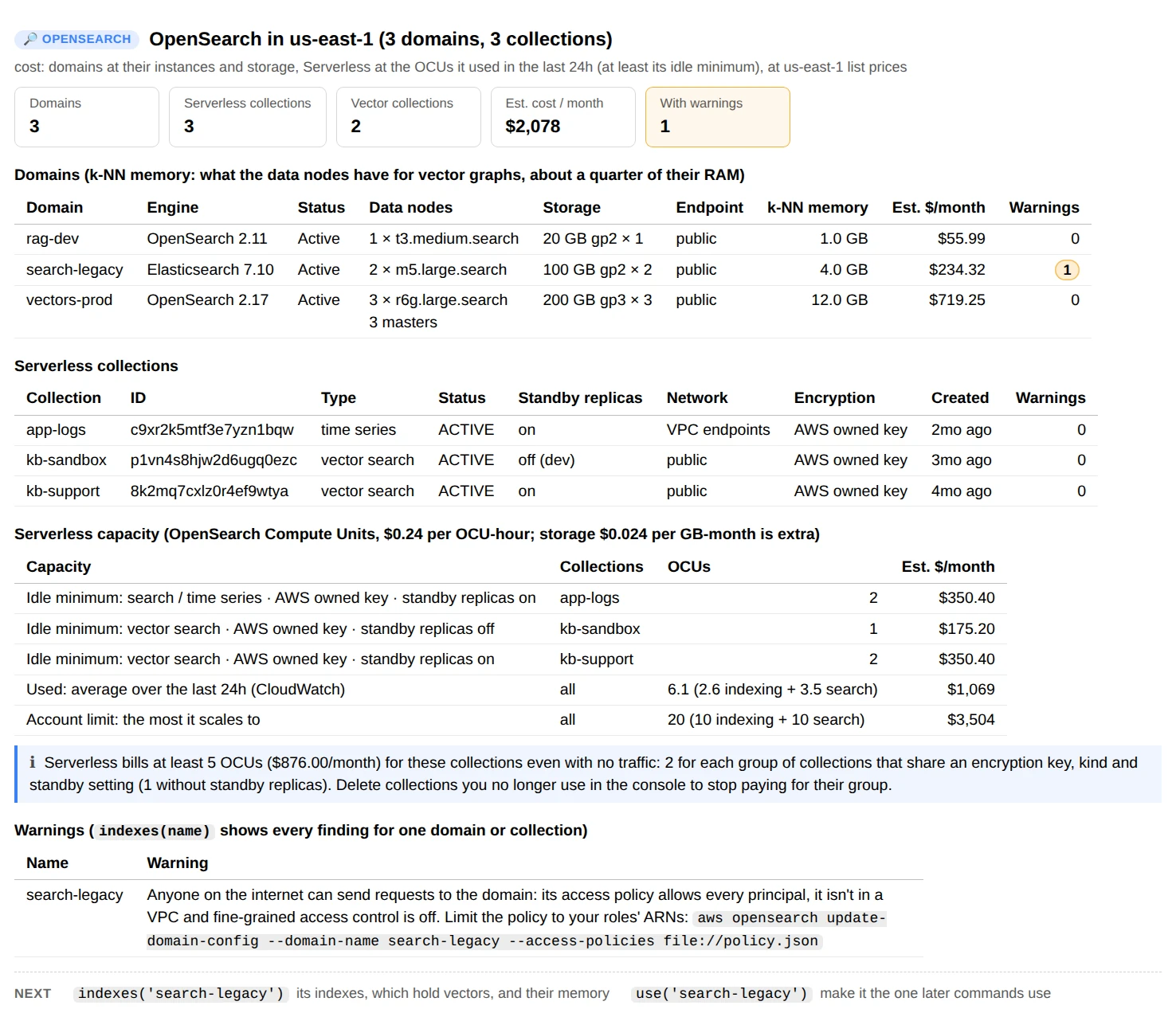
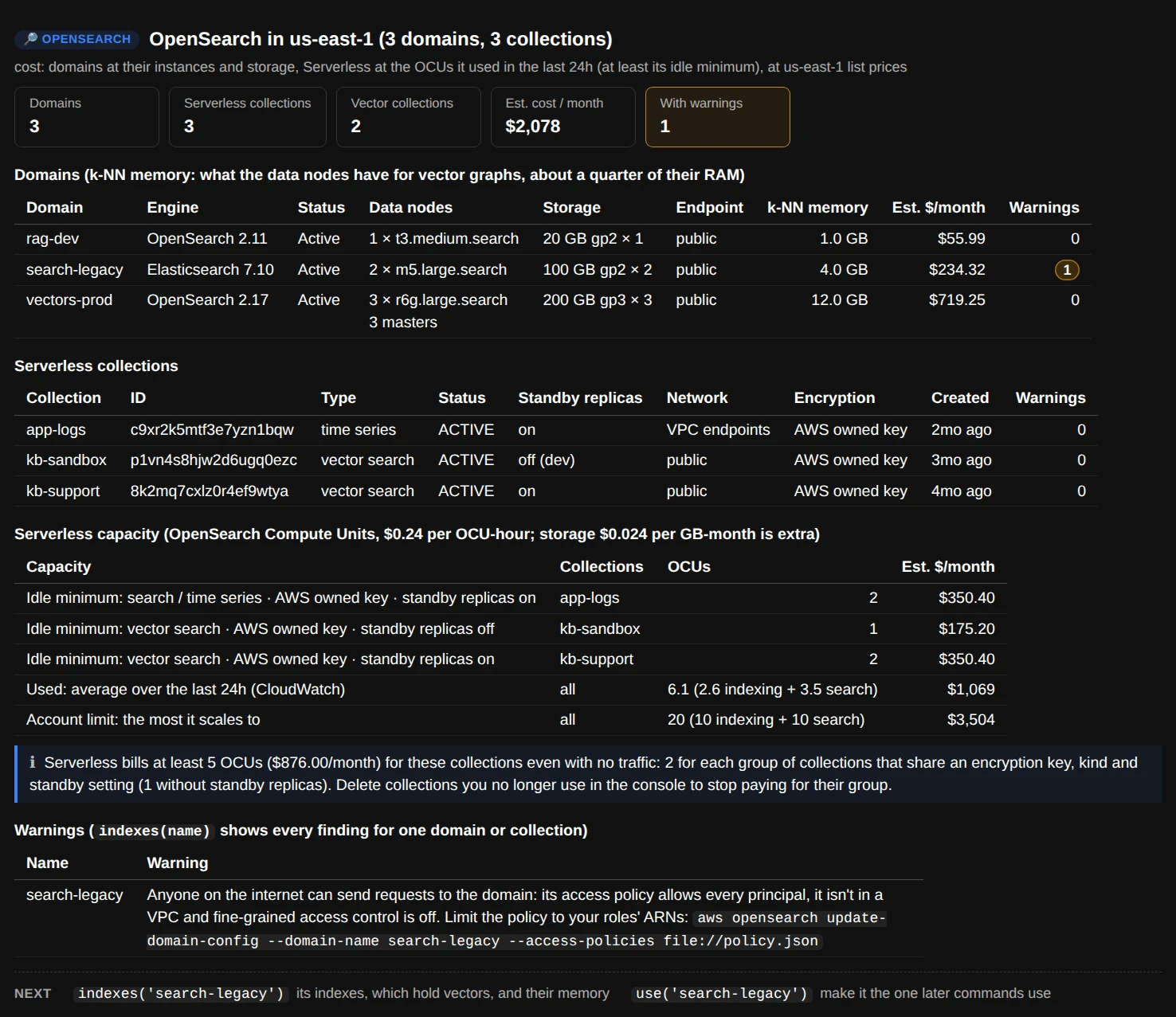
ui.overview(): what each domain runs on and costs, how much memory its nodes have for vector graphs, and what Serverless bills even when idle.
- Domains: engine and version, data nodes, storage, whether the endpoint is public or inside a VPC, and the k-NN memory: what the data nodes have for vector graphs. OpenSearch Service gives the Java heap half of each node's memory (up to 32 GiB), and the k-NN plugin may use half of the rest, so an
r6g.large.searchwith 16 GiB has about 4 GB for graphs. - Serverless collections: type (vector search, search or time series), standby replicas, network access and encryption key. Serverless bills in OpenSearch Compute Units (OCUs): at least 2 for each group of collections that share an encryption key, a type and the standby setting (1 without standby replicas), even with no traffic. The capacity table puts that minimum next to what the account used in the last 24 hours (CloudWatch) and the most it can scale to.
- Warnings come from each domain's settings: open to the internet without fine-grained access control, the old Elasticsearch k-NN plugin, versions without on-disk vectors, burstable instances, one data node, gp2 storage, encryption or HTTPS off, a waiting software update.
indexes("name")shows every finding for one.
use("vectors-prod") makes a domain or collection the one later commands work on, and use("vectors-prod/support-docs") an index in it.
Indexes
Every index in a domain or collection
indexes() lists the indexes with their documents, size and shards, and for each vector field its dimensions, engine and similarity, how many documents have a vector, and the memory its graphs need, estimated with OpenSearch's own sizing rule. On a domain it also reads the cluster's health and what the k-NN plugin has in memory now.
ui.indexes("vectors-prod")
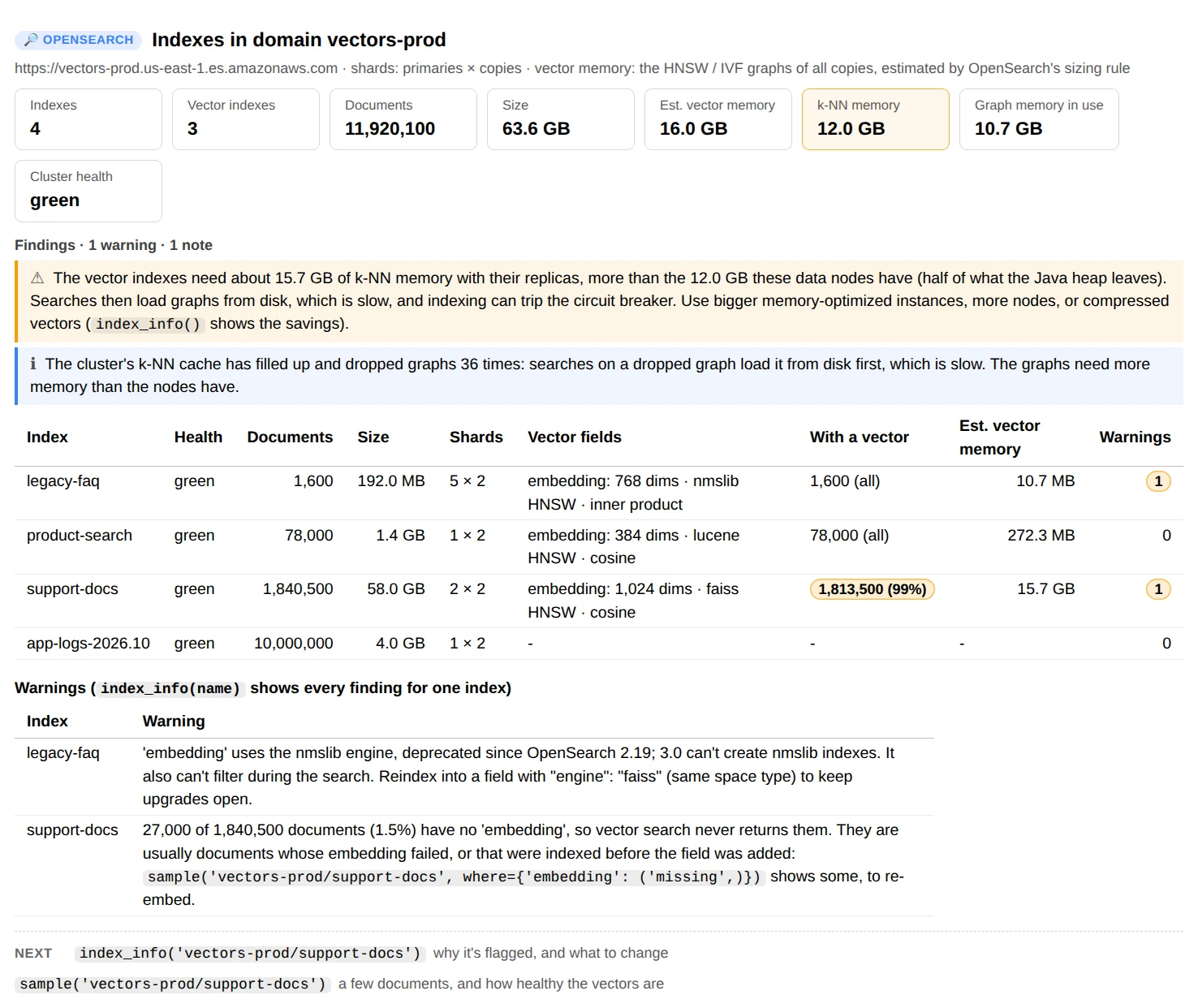
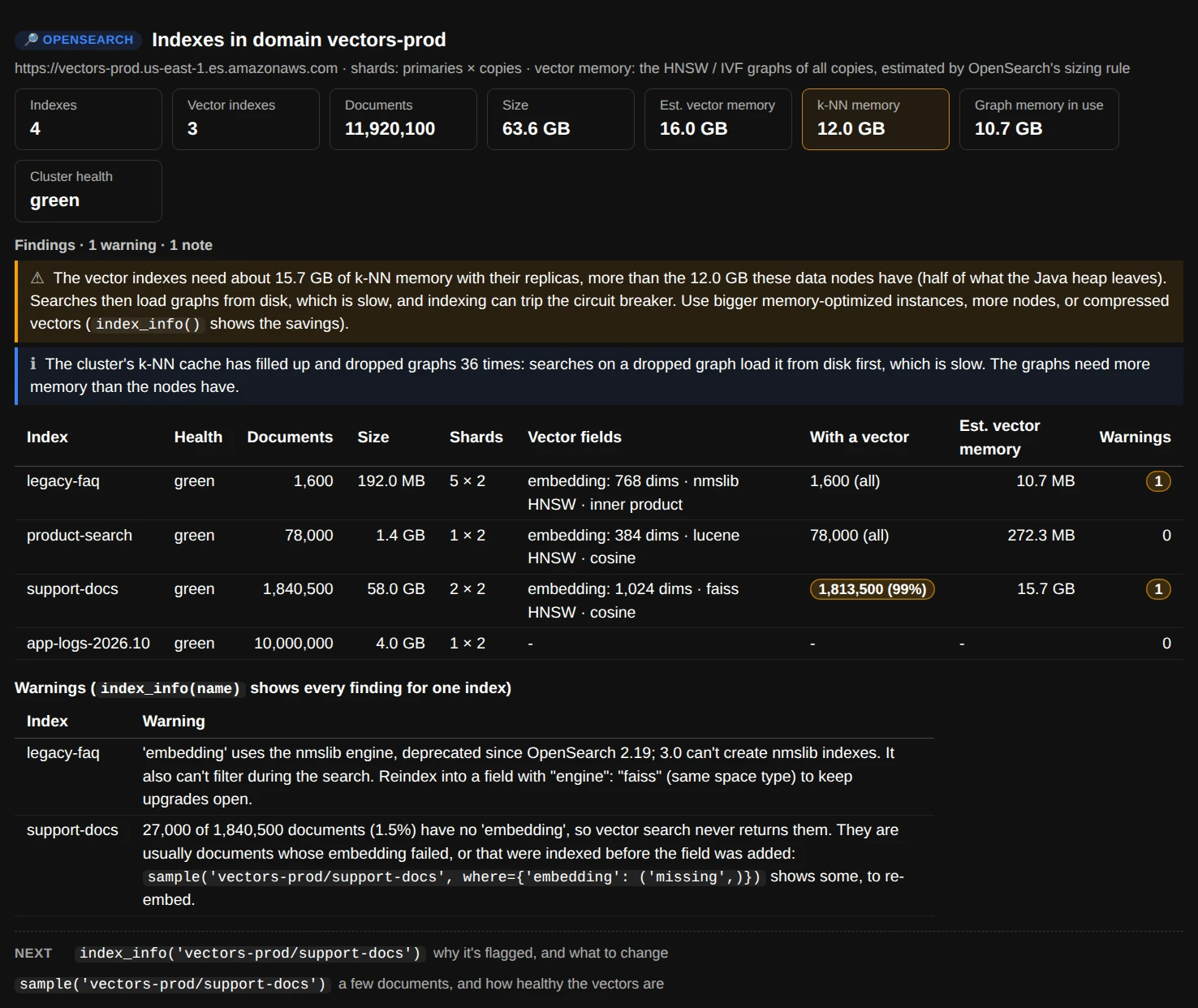
ui.indexes("vectors-prod"): the graphs need more memory than the nodes have, so searches load them from disk; one index uses a deprecated engine, another has documents vector search can't find.
The findings that matter most for vector search:
- The graphs don't fit. faiss and nmslib graphs live in the k-NN plugin's memory. When all the copies' graphs need more than the nodes have, searches load graphs from disk (slow) and indexing can trip the k-NN circuit breaker. The fix is bigger memory-optimized instances, more nodes, or compressed vectors (
index_info()shows how much each option saves). - Documents without a vector. A document with no vector is never returned by a vector search, however relevant its text.
sample("vectors-prod/support-docs", where={"embedding": ("missing",)})shows some. - A deprecated engine. nmslib is deprecated since OpenSearch 2.19, and 3.0 can't create nmslib indexes. faiss with the same space type is the replacement.
On Serverless, shards, replicas and memory are managed for you, so the report leaves them out.
One vector index in detail
index_info() explains one index: each vector field's dimensions, engine and algorithm with its settings, the similarity and what a score means, how many documents have a vector, the memory the graphs need against what the nodes have, the fields you can filter on (each with the where= to copy), and the k-NN query as code.
ui.index_info("vectors-prod/support-docs")
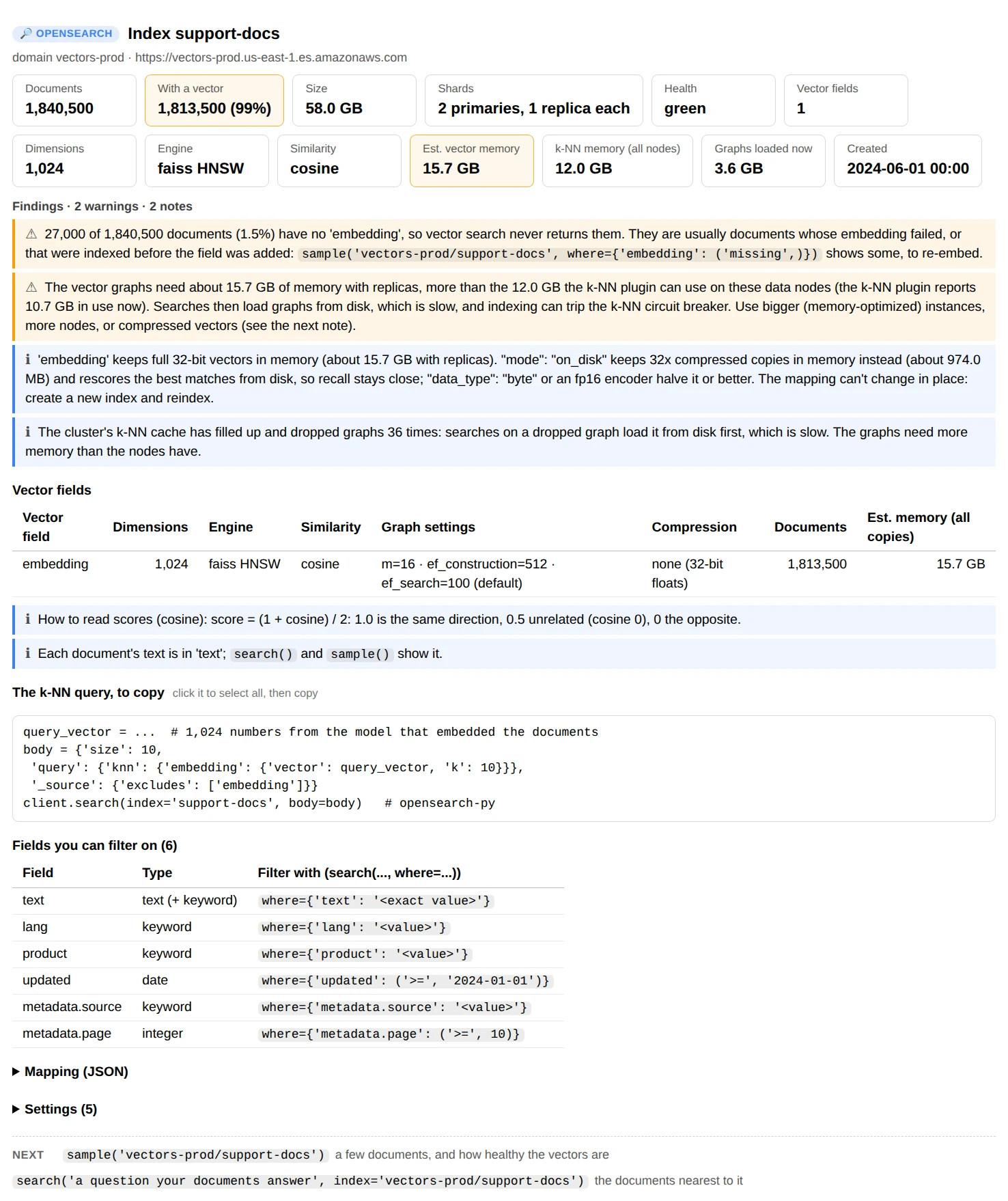
ui.index_info("vectors-prod/support-docs"): 32-bit vectors that need 15.7 GB with replicas, and what on-disk mode would need instead.
How the memory is estimated. OpenSearch's sizing rule for HNSW is 1.1 × (bytes per vector + 8 × m) per vector, for every copy (primary and replicas each build their own graphs); for IVF it's 1.1 × (bytes per vector × vectors + 4 × nlist × dimensions). A 32-bit float vector takes 4 bytes per dimension, and compression shrinks that:
| Mapping | Bytes per vector (1,024 dimensions) | Needs |
|---|---|---|
"data_type": "float" (the default) |
4,096 | |
an fp16 encoder (faiss) |
2,048 | OpenSearch 2.13 |
"data_type": "byte" |
1,024 | lucene 2.9, faiss 2.17 |
"mode": "on_disk" (32x by default), or "compression_level" |
128 at 32x | OpenSearch 2.17 |
"data_type": "binary" |
128 | OpenSearch 2.16 |
On-disk mode keeps the compressed vectors in memory and rescores the best matches with the full vectors from disk, so recall stays close to the full-precision index. The mapping can't change in place: create a new index with it and reindex. lucene's graphs live in the operating system's file cache rather than the k-NN plugin's memory, so they don't count against the k-NN limit, though they still want the memory.
Look at the vectors
sample() reads random documents and shows a few with their text, where each came from and their other fields (vectors as dimensions and length). It checks 200 documents' vectors on the way: whether they all have one size, whether they're unit length, and whether any are all zeros or exact repeats.
ui.sample("vectors-prod/support-docs")
ui.sample("vectors-prod/support-docs", where={"embedding": ("missing",)})   # documents with no vector
ui.sample("vectors-prod/support-docs", n=20, check=1000)                    # show 20, check 1,000
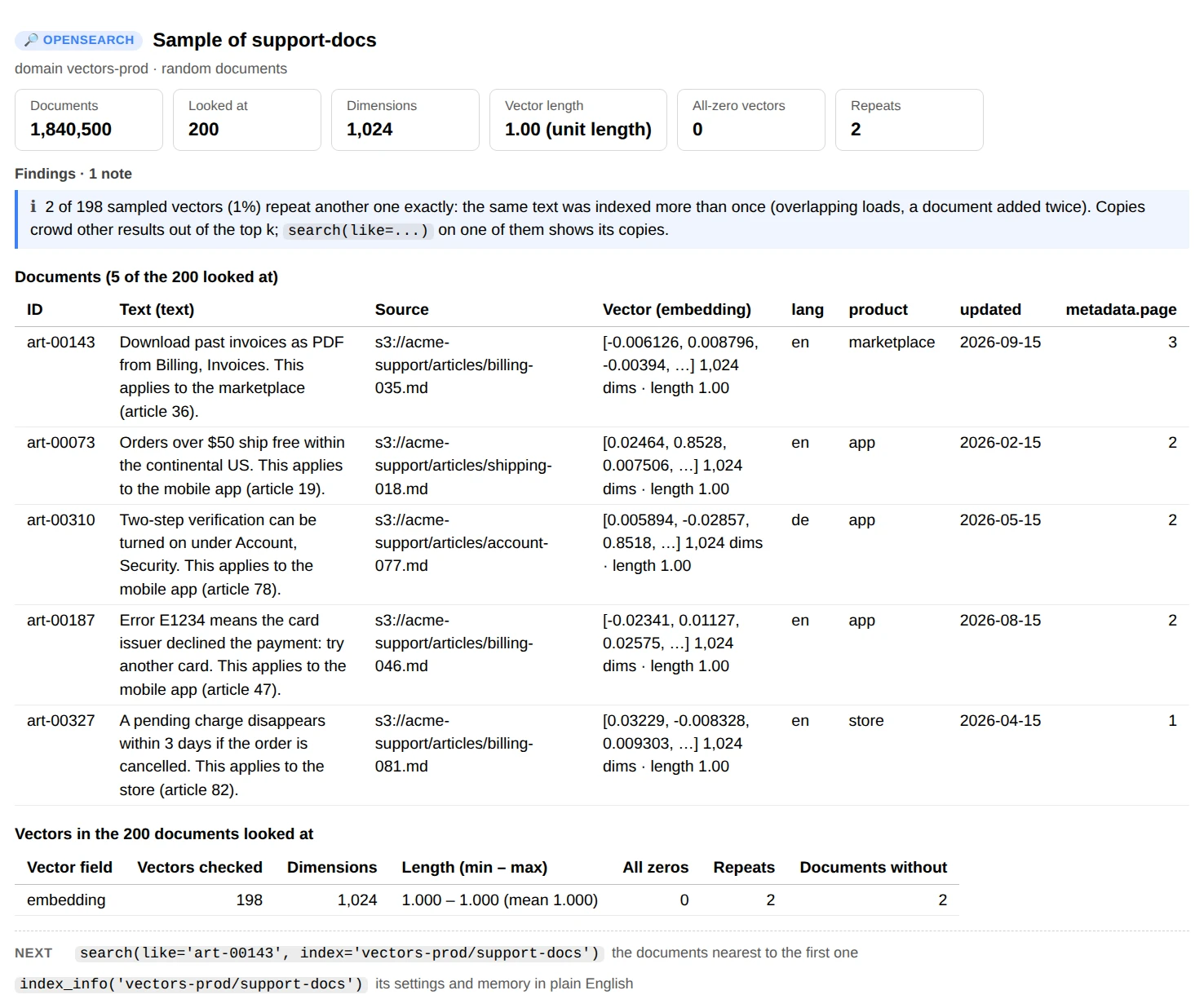
ui.sample("vectors-prod/support-docs"): unit-length vectors, a few repeated passages, and where each document came from.
What the checks mean:
- All-zero vectors usually come from empty text or an embedding call that failed. Cosine similarity can't compare them, so with
cosinesimilthose documents never match. - Repeats: the same text indexed twice (an overlapping load, a document added again). Copies crowd other results out of the top k.
- Lengths that vary matter when the index ranks by inner product (long vectors win over close ones) or L2 distance (length counts as well as direction). Most embedding models are meant to be compared by cosine: normalize the vectors before indexing, or use
"space_type": "cosinesimil".
Search
search() runs one k-NN search and shows the k nearest documents with their score, the similarity the score stands for (the cosine, inner product or distance, read back from OpenSearch's score formula), their text, source and fields.
ui.search("how do I get my money back?", index="vectors-prod/support-docs")
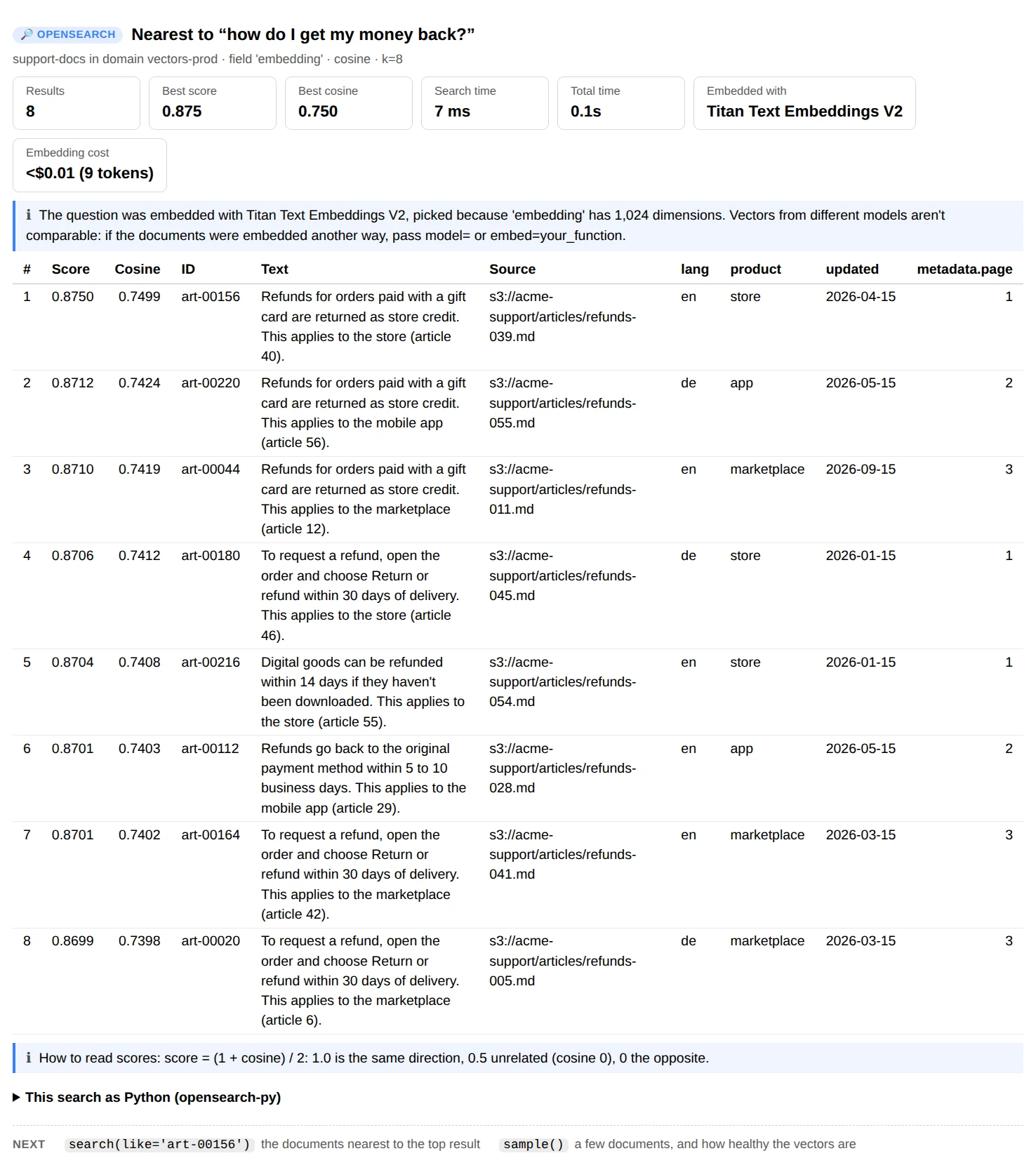
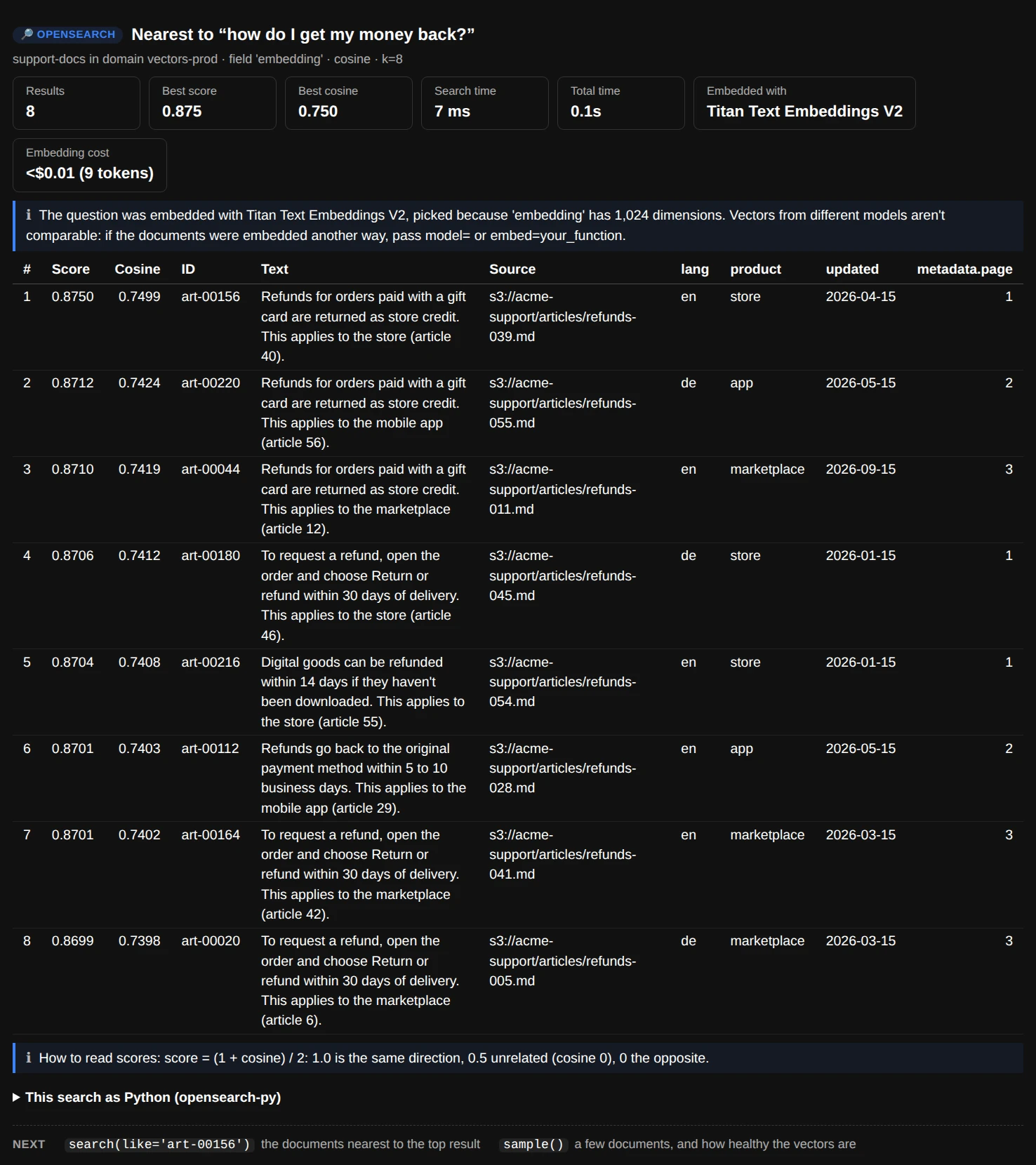
ui.search("how do I get my money back?"): refund articles at cosine 0.74 to 0.75, the question embedded with Titan Text Embeddings V2 for less than a cent.
Three ways to ask
| Call | Searches with |
|---|---|
search("how do refunds work?") |
The question embedded with a Bedrock model. With no model=, Titan Text Embeddings V2 for fields of 256, 512 or 1,024 dimensions; for any other size, say which model |
search("how do refunds work?", model="cohere") |
Another Bedrock model: "titan" (V2), "titan-v1", "titan-multimodal", "cohere", "cohere-multilingual", "cohere-v4", a model ID or an inference profile |
search("how do refunds work?", embed=model.encode) |
Your own function from text to a vector: a SageMaker endpoint, sentence-transformers, any model |
search(vector=v) |
A vector you already have (a list or a numpy array) |
search(like="art-00156") |
That document's own vector, so no model is needed; the document itself is left out of the results |
Embed the question with the model that embedded the documents. Vectors from different models aren't comparable, so the wrong model gives results that look random. The report says which model it used and why. A vector of the wrong size is refused before anything is searched.
Filters (where=)
where= narrows a search (or a sample) to documents whose fields match, during the search when the engine can (faiss and lucene), so you still get k results. It takes a dict, and every condition must match:
where= |
Means |
|---|---|
{"lang": "en"} |
lang is en (a text field is matched through its .keyword sub-field when it has one) |
{"product": ["store", "app"]} |
one of these, also ("in", [...]) |
{"year": (">=", 2024)} |
also ">", "<", "<=", "=", "!=" |
{"updated": ("between", "2026-01-01", "2026-06-30")} |
both ends included |
{"metadata.source": ("prefix", "s3://acme-support/articles/refunds")} |
starts with |
{"text": ("contains", "gift card")} |
the words, anywhere in a text field |
{"embedding": ("missing",)} |
the field isn't set, also ("exists",) |
A field the index doesn't have is reported with the closest names. Query DSL works too: where={"bool": {...}} is passed through as it is. index_info() lists the fields you can filter on, each with a where= to copy.
nmslib can't filter during the search: it finds the k nearest, then drops the ones that don't match, so fewer than k can come back. The report says so when it happens.
Reading scores
OpenSearch turns each distance into a score where higher is closer. The report reads the score back into the measure behind it:
| Space type | OpenSearch's score | Shown as |
|---|---|---|
cosinesimil |
(1 + cosine) / 2: 1 is the same direction, 0.5 unrelated | Cosine |
innerproduct |
1 + inner product when it's positive, else 1 / (1 − inner product) | Inner product |
l2 |
1 / (1 + squared L2 distance) | Squared L2 distance |
l1, linf, hamming |
1 / (1 + distance) | Distance |
For unit-length vectors (most embedding models return them), L2 distance, inner product and cosine all rank documents the same way.
Use the data in Python
Every report has a data version on ui.core (an OpenSearchAnalyzer) that returns dataclasses and DataFrames instead of printing.
aos = ui.core

ov = aos.overview()                                    # Overview: .domains, .collections, .ocus
report = aos.indexes("vectors-prod")                   # StoreReport: .indexes, .vector_indexes, .health, .knn
info = aos.index("vectors-prod", "support-docs")       # IndexInfo: .vectors, .fields, .with_vector, .settings
vf = info.vector()                                     # VectorField: .dimension, .engine, .space, .m, ...

s = aos.sample("vectors-prod", "support-docs", 500)    # Sample: .docs, .checks["embedding"]
s.to_df()

r = aos.search("vectors-prod", "support-docs", vector=v, k=20, where={"lang": "en"})
r.to_df()                                              # rank, id, score, similarity and the fields
aos.embed("refund policy", model="titan")              # Embedding: .vector, .tokens, .cost

aos.request("vectors-prod", "support-docs/_search", {"query": {"match": {"text": "refund"}}})   # any search
request() sends any read: a GET, or a body to _search or _count. Anything that could change data is refused before it's sent.
The analysis functions don't call AWS, so they also work on mappings and documents you already have: parse_mapping, read_settings, vector_memory, index_vector_memory, knn_memory_limit, check_vectors, score_to_similarity, build_filter, knn_query, query_python, domain_monthly_cost, serverless_minimum, and the findings: domain_findings, collection_findings, index_findings, store_findings, vector_findings, search_findings.
from aws_analyzer.opensearch import check_vectors, parse_mapping, vector_memory

fields, vectors, _ = parse_mapping(my_index_body["mappings"])   # before you create the index
vector_memory(vectors[0], 2_000_000)                            # bytes its graphs will need
check_vectors(my_embeddings)                                    # lengths, zeros and repeats before you load them
Cost
-
Domains
Every data, master and UltraWarm node at its hourly list price, plus each data node's EBS storage (gp3 $0.122 per GB-month, gp2 $0.135). IOPS and throughput above gp3's baseline aren't included.
-
Serverless
$0.24 per OCU-hour, indexing and search alike, and at least the idle minimum. Storage is $0.024 per GB-month on top.
-
Embedding questions
Titan Text Embeddings V2 costs $0.02 per million tokens, so a question costs far less than a cent. The search report shows the tokens and cost.
-
The tool itself
overview()only calls the AWS APIs. Reports read what they show:indexes()a count per vector index,sample()200 documents,search()one search. Serverless doesn't bill by the request.
Costs are estimates at us-east-1 list prices from the AWS Price List API (OPENSEARCH_PRICES, with the hourly price, vCPUs and memory of each instance type in INSTANCE_TYPES). For another region or a discount, pass your own:
ui = OpenSearchView(OpenSearchAnalyzer(prices={"r6g.large.search": 0.195, "gp3": 0.146, "ocu_hour": 0.30}))
Permissions
Everything is read-only. Anything the notebook's role can't read shows up as a note instead of an error, so you can start with less and add what you need. This IAM policy covers every command:
{
  "Version": "2012-10-17",
  "Statement": [
    {
      "Sid": "Domains",
      "Effect": "Allow",
      "Action": ["es:ListDomainNames", "es:DescribeDomains", "es:DescribeDomain"],
      "Resource": "*"
    },
    {
      "Sid": "ReadDomainIndexes",
      "Effect": "Allow",
      "Action": ["es:ESHttpGet", "es:ESHttpPost"],
      "Resource": "arn:aws:es:*:*:domain/*/*"
    },
    {
      "Sid": "Collections",
      "Effect": "Allow",
      "Action": [
        "aoss:ListCollections", "aoss:BatchGetCollection", "aoss:ListSecurityPolicies", "aoss:GetSecurityPolicy",
        "aoss:GetAccountSettings", "aoss:APIAccessAll"
      ],
      "Resource": "*"
    },
    {
      "Sid": "ServerlessUsage",
      "Effect": "Allow",
      "Action": "cloudwatch:GetMetricData",
      "Resource": "*"
    },
    {
      "Sid": "EmbedQuestions",
      "Effect": "Allow",
      "Action": "bedrock:InvokeModel",
      "Resource": "arn:aws:bedrock:*::foundation-model/amazon.titan-embed-text-v2:0"
    }
  ]
}
es:ESHttpPost is there for searches: a search with a body is a POST. The tool only POSTs to _search and _count, but IAM can't tell a search from a write. Two more things decide what the role may read inside a domain or collection:
- A domain's access policy must allow the role too, unless the domain uses fine-grained access control with an open policy. With fine-grained access control, also map the role to an OpenSearch role that can read: the built-in
readall_and_monitorcovers searches, mappings, settings, counts and cluster health (OpenSearch Dashboards → Security → Roles →readall_and_monitor→ Mapped users). The k-NN memory numbers also needcluster:admin/knn_stats_action; without it that part of the report is a note. -
A Serverless collection needs a data access policy that gives the role read access to its indexes:
Data access policy[ { "Description": "Read-only access for the SageMaker notebook", "Rules": [ {"ResourceType": "index", "Resource": ["index/kb-support/*"], "Permission": ["aoss:DescribeIndex", "aoss:ReadDocument"]}, {"ResourceType": "collection", "Resource": ["collection/kb-support"], "Permission": ["aoss:DescribeCollectionItems"]} ], "Principal": ["arn:aws:iam::123456789012:role/service-role/AmazonSageMaker-ExecutionRole-20240611"] } ]
Troubleshooting
“Couldn't reach domain … It only answers inside VPC …”
The domain's endpoint is inside a VPC and the notebook isn't. Run the notebook in that VPC (a notebook instance's or Studio domain's network settings), and allow HTTPS (port 443) from the notebook's security group in the domain's security group. For a Serverless collection, its network policy decides who can connect: overview() shows each collection's network access.
“… refused the request (403)”
The role is missing a permission. On a domain: es:ESHttpGet and es:ESHttpPost in IAM, the domain's access policy, and with fine-grained access control a role mapping (see Permissions). On Serverless: aoss:APIAccessAll in IAM and the collection's data access policy.
“… asked for a user name and password”
The domain uses fine-grained access control with its own user database. Pass the user: OpenSearchView(OpenSearchAnalyzer(auth=("user", "password"))), or map your IAM role to an OpenSearch role.
“Which model embedded these 1,536-dimension vectors?”
The tool only guesses the model for 256, 512 and 1,024 dimensions (Titan Text Embeddings V2, the Bedrock knowledge base default). Say which model made the documents' vectors: model="titan-v1", model="cohere-v4", or embed=your_function for a model outside Bedrock.
The results look unrelated to the question
The question was probably embedded differently from the documents: another model, another dimension setting, or not normalized. Check with search(like="<a document you know>"), which uses the index's own vectors: if those neighbours make sense, the index is fine and the question's embedding isn't.
An Elasticsearch domain shows no vector fields
Elasticsearch 7 domains use the older Open Distro k-NN plugin. The tool reads their knn_vector mappings too, but some settings live in the index settings rather than the mapping. Upgrading to OpenSearch 2.x adds filtering during the search and vector compression.
The report lost its formatting after I reopened the notebook
JupyterLab strips the report's styles from saved output when a notebook is reopened. Run the cell again to get the formatted report back.
Command reference
Every OpenSearchView command. ui.help() prints the same list grouped by task, and ui.help("search") shows one command's full description.
| Command | What it shows |
|---|---|
overview(match=None, metrics=True) |
Every domain and Serverless collection in the region: nodes, storage, endpoint, k-NN memory, estimated cost, Serverless OCUs, warnings |
use(where) |
Sets the domain or collection, and with "name/index" the index, that later commands use |
indexes(target=None, hidden=False) |
Every index: documents, size, shards, vector fields, documents with a vector, estimated vector memory, cluster health, warnings |
index_info(index=None) |
One index: vector fields and their settings, what a score means, memory, fields to filter on, findings, the query to copy |
sample(index=None, n=10, check=200, where=None) |
A few random documents, and a check of the vectors: sizes, lengths, zeros, repeats |
search(query=None, index=None, vector=, like=, k=10, where=, field=, model=, embed=) |
The k nearest documents, with score and similarity, text, source and fields |
help(command=None) |
This list, grouped by task; help("name") shows one command in full |