 aws-analyzer · bedrock_kb.py
Check, search and ask your Bedrock knowledge bases from a SageMaker notebook
Install it in your notebook to see whether your knowledge bases are healthy, how each file was indexed, what a question retrieves, and how well an answer is backed by its sources, with each claim linked to the passage behind it. Or open the explorer window and see it all by clicking.
- One install, boto3 only
- Read-only: never starts a sync
- Any Bedrock model
- An explorer window: click, don't type
- Plain text outside Jupyter
Every example uses a knowledge base called support-docs: support policies (PDFs and Markdown files) in the S3 bucket support-docs-bucket, some with a .metadata.json file that tags them with a team and a year. Use your own names. The screenshots are real output from the tool, run against demo knowledge bases with synthetic documents and a simulated Bedrock, so the scores, answers and times are illustrative.
Set up in SageMaker
-
Install the package, in a notebook cell:
%pip install aws-analyzerNo internet in the notebook (VPC-only mode)? On a computer that has internet, download the package and copy it to a bucket the notebook can read (
pip download aws-analyzer --no-deps -d wheels, thenaws s3 cp --recursive wheels/ s3://acme-ml-data/tools/wheels/), and install it from there:!aws s3 cp --recursive s3://acme-ml-data/tools/wheels/ wheels/ %pip install --no-index --find-links wheels aws-analyzer -
Import it and create the view. It uses the notebook's IAM execution role and region, so there's nothing to configure.
from aws_analyzer import BedrockKBView ui = BedrockKBView() # uses the notebook's IAM role and region ui.help() # every command, grouped by task; ui.help("ask") shows one in full -
Optional: another region or AWS profile, a default knowledge base, or plain-text output. Knowledge bases are regional, so if
kbs()comes back empty, check the region first.from aws_analyzer import BedrockKBAnalyzer, BedrockKBView ui = BedrockKBView(BedrockKBAnalyzer(region="us-west-2", profile="dev")) ui = BedrockKBView(kb="support-docs") # commands use this knowledge base unless given another ui = BedrockKBView(mode="text") # plain text, e.g. in a terminal or a script ui = BedrockKBView(progress="plain") # a plain progress line instead of tqdm bars ("off": none)
Only boto3 is required. Answers are generated through Bedrock itself, so no model SDK is needed and any model enabled in your account works. pandas (preinstalled on SageMaker) is used only when you ask for a DataFrame.
Five-minute tour
The commands you'll use most. Each one prints a report under the cell; none of them change anything.
ui.kbs()                                     # every knowledge base: store, model, last sync, warnings
ui.use("support-docs")                       # later commands use this one (a name, ID or ARN)
ui.kb_info()                                 # its settings in plain English, data sources, syncs, findings
ui.search("How long do refunds take?")       # the passages a question retrieves, best first
ui.chunk(1)                                  # the full text and metadata of result #1
ui.ask("How long do refunds take?")          # an answer with [1][2] citations
ui.follow_up("And for digital goods?")       # the next question in the same conversation
ui.evaluate([("refund window?", "refund-policy.pdf")])   # does retrieval find the right file?
ui.files()                                   # every file next to Bedrock's record of it: failed, changed, not synced...
ui.file("refund-policy.pdf")                 # how one file was indexed: its parser, chunks in order, metadata
ui.explore()                                 # all of it in a window, by clicking
Reading a report. Every report puts the answer first: cards with the numbers that matter (a card turns amber or red when a finding is about it), then the findings, warnings first, each ending in what to do. The tables of detail come after, with status cells such as FAILED in colour, and at the bottom a Next row of two or three commands with the arguments filled in from this report, such as chunk(1). One click on a command anywhere in a report, or on a code block, selects all of it, ready to copy. ui.help() lists every command by task; ui.help("ask") shows one in full.
Commands take kb=: a name in any case, the 10-character ID, or the ARN. Without it they use the one set by use(), else the only knowledge base in the region, else they list the ones there and say how to pick.
The explorer window
Rather click than type? explore() opens a window on a knowledge base with nothing to type but a question. It puts every file of the knowledge base's S3 data sources next to Bedrock's record of it, shows how each one was indexed, and has the syncs, a search box and every setting a click away. Like the commands, it only reads: where a sync would help, it shows the command to run.
from aws_analyzer.bedrock_kb import explore

explore()                             # the only knowledge base here, or the first active one
explore("support-docs")               # a name, ID or ARN
explore("support-docs", file="warranty.pdf")   # straight to one file's page
explore(region="us-west-2")           # another region (or profile="dev")
explore("support-docs", height=800)   # 800px pages (else the browser's height)
ui.explore()                          # from a BedrockKBView, on its knowledge base
The window needs ipywidgets, which SageMaker notebooks already have (elsewhere, %pip install ipywidgets, then reload the browser tab). Without it, or outside Jupyter, explore() shows the same as reports: files(), file() and search_file().
The top of the window is the knowledge base field and its cards. Click the field for the region's knowledge bases, with a search box that finds one by its name, part of its ID (k7qj finds K7QJ2M4XNA) or its description; Enter picks the first, and a whole ID or ARN works too. The cards say how it's doing: how many files it has and how many are searchable, how many failed or are waiting for a sync, when the last sync ran, and what its vector store costs while idle. The tabs below hold the rest, and the line at the bottom says what's going on.
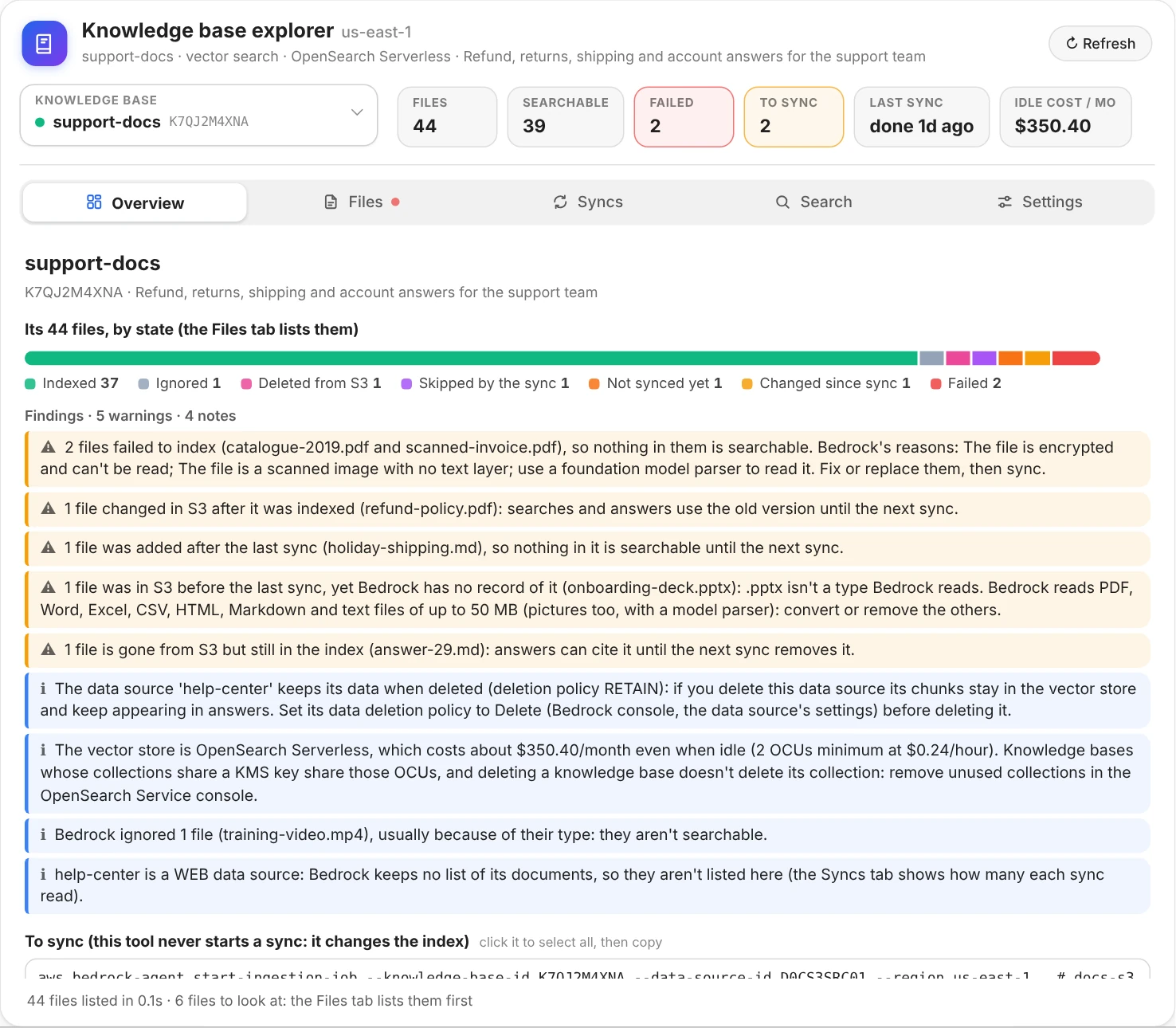
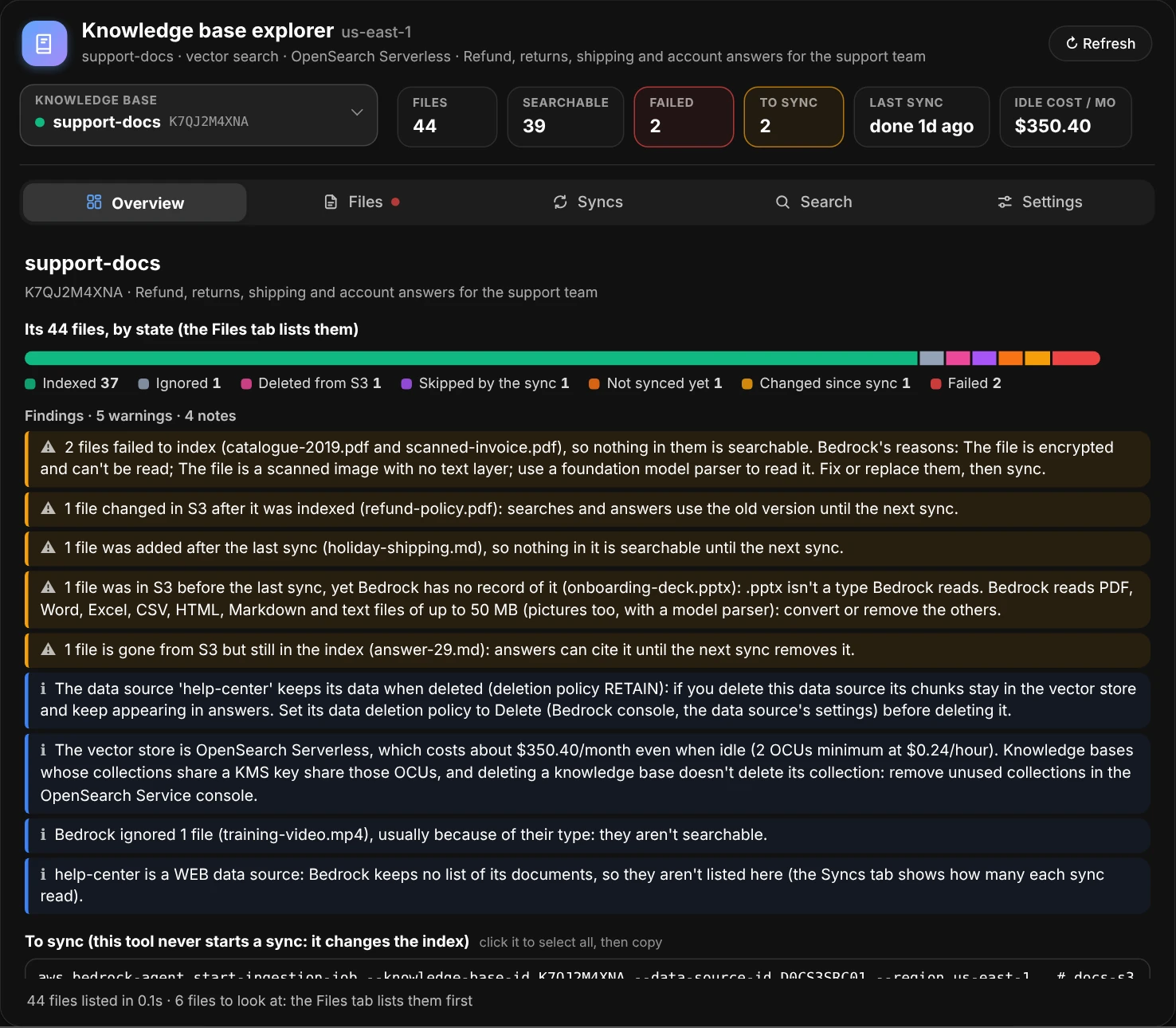
Overview: the files by state, and what to do about each kind. Below, out of the picture: the commands that sync the data sources that need it, how each data source becomes vectors, and the recent syncs.
Every file, next to Bedrock's record of it
The Files tab lists every file in the data sources' S3 buckets (under their inclusion prefixes) next to Bedrock's own record of it, and puts the two together in one state. Problems come first. Type in the search box to find a file by part of its name, its folder or Bedrock's reason; click a state's chip to see only those files (click it again for all of them), pick a data source when there are several, or sort by name, folder, size, last change or when it was last indexed.
| State | What it means | What to do |
|---|---|---|
| Failed | Bedrock couldn't index it, for the reason shown: an encrypted PDF, a scan with no text layer, a file too big | The file's page says what usually fixes that reason, then sync |
| Changed since sync | It (or its .metadata.json) changed in S3 after it was indexed, so searches still find the old version |
Sync |
| Not synced yet | Added after the last sync, so nothing in it is searchable | Sync |
| Skipped by the sync | In S3 before the last sync, yet Bedrock has no record of it: usually a type Bedrock doesn't read, a file over 50 MB, or one in GLACIER | Convert, split or restore it, then sync |
| Deleted from S3 | Gone from S3, but still in the index, so answers can cite it | Sync, and the next sync removes it |
| Partly indexed | Only part of it, or of its metadata, was indexed | Its page says what's missing |
| Ignored | Bedrock skipped it on purpose, usually because of its type | Nothing, unless you meant it to be searchable |
| Indexing | Being indexed or removed right now | Wait for the sync to finish |
| Not checked | Past the first 10,000 documents of Bedrock's list | Open it: its own record is looked up |
| Indexed | Indexed, up to date and searchable |
How a file was indexed
Click a file to see its page on the right: its state and what to do about it, then each step it took from S3 into the vector store, the one that failed in red. Stored in S3 (its size, type and when it last changed), Read by the parser (the default parser reads the text only; a foundation model or Data Automation parser also reads tables, charts and scans), Cut into chunks (how many, how big, from which pages, and the data source's chunking), Embedded (the model and its dimensions), Stored as vectors (the vector store and its index) and where it stands Now.
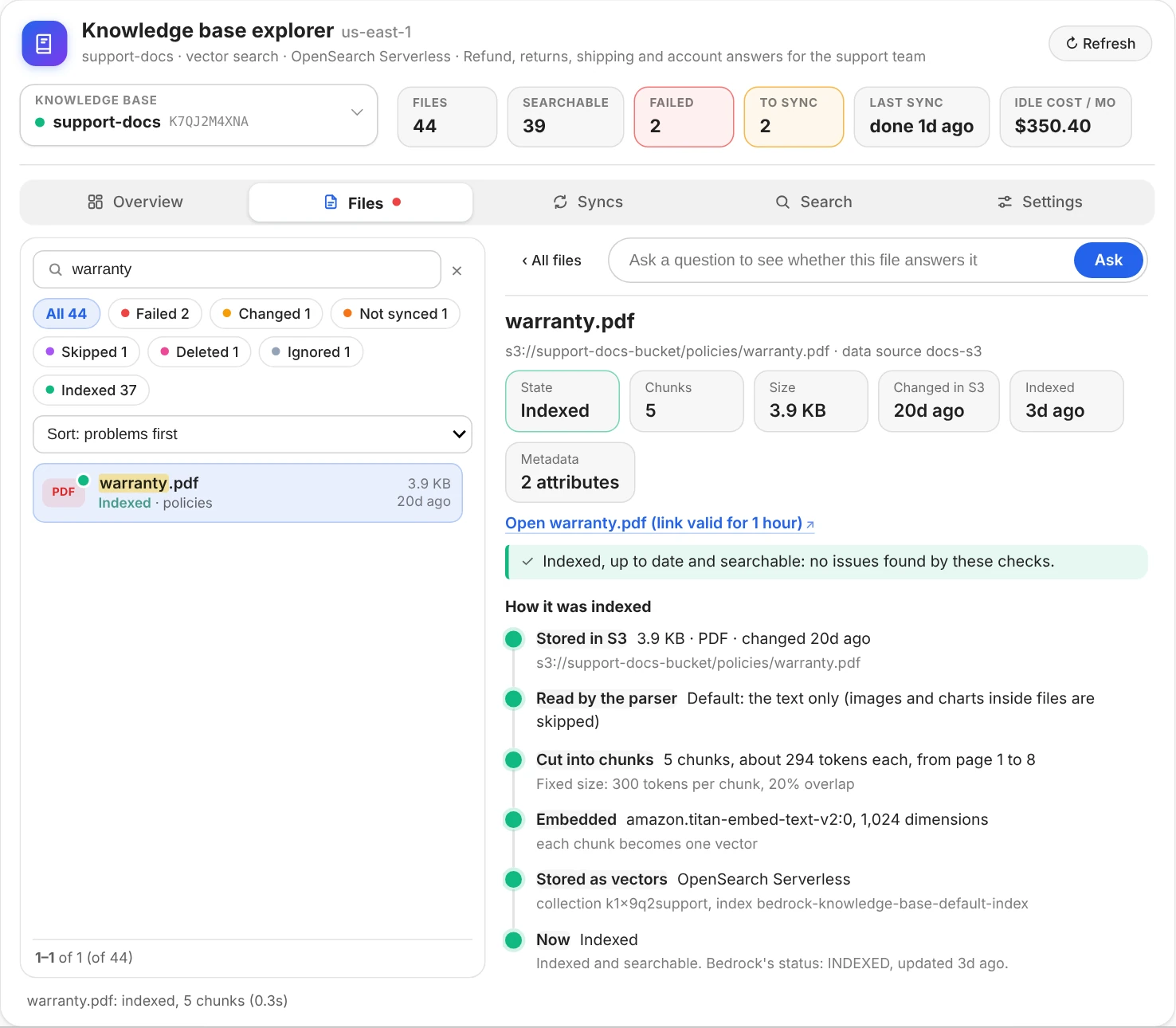
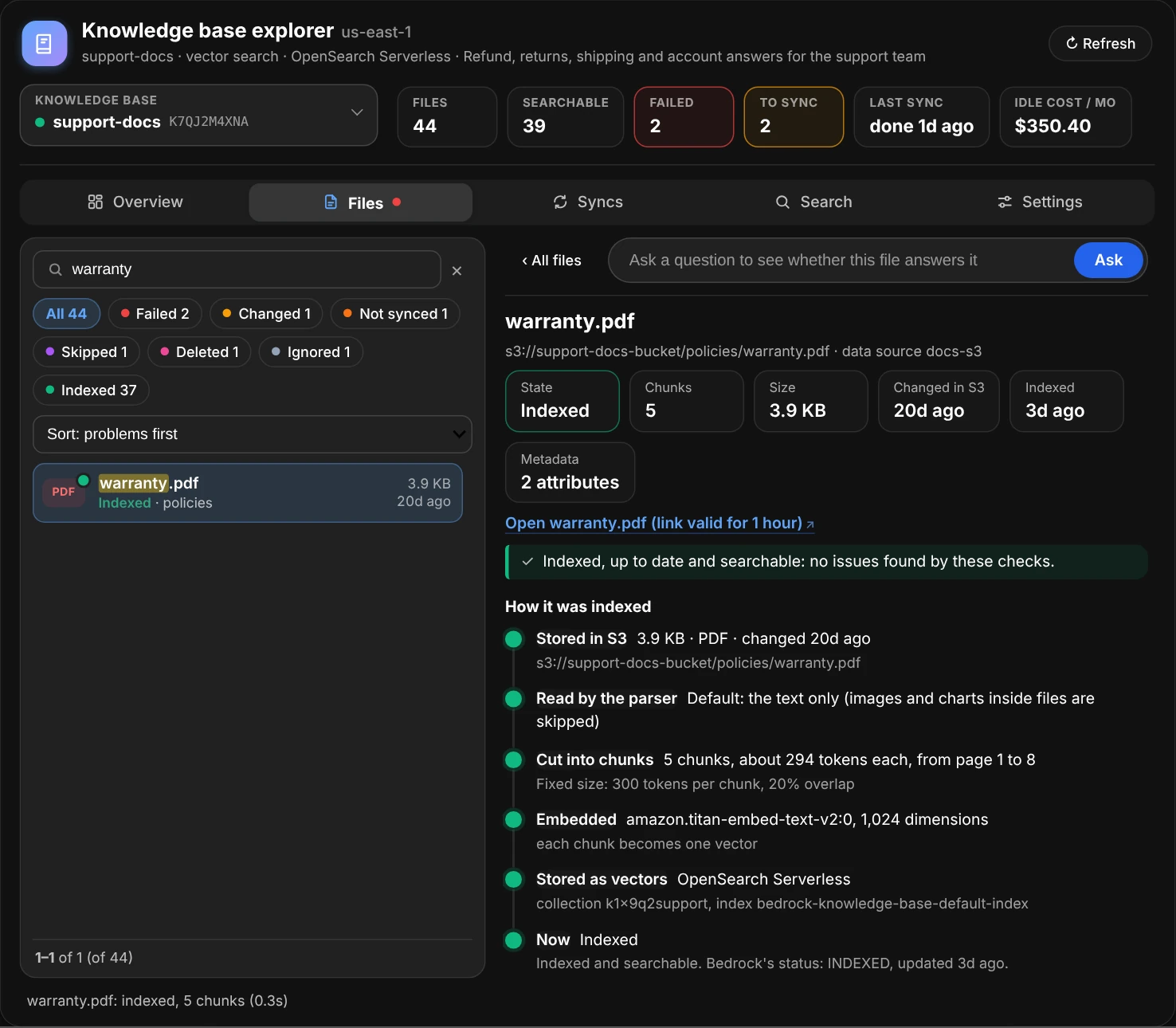
A file's page: each step from S3 into the vector store, here all of them green.
Below the steps come its chunks, read from the vector store itself (a search limited to the file), in the order they come in the document. The bar shows one block per chunk, as wide as its text, with tiny ones in amber; for a .txt or .md file, a second bar shows where each chunk sits in the file, and what no chunk holds. Each chunk is a line with its page, its size in tokens and words, and its first words; click it for its full text and its metadata. With fixed-size or hierarchical chunking, each chunk starts with the end of the one before it: that overlap is marked in green, and the line says how many characters it repeats.
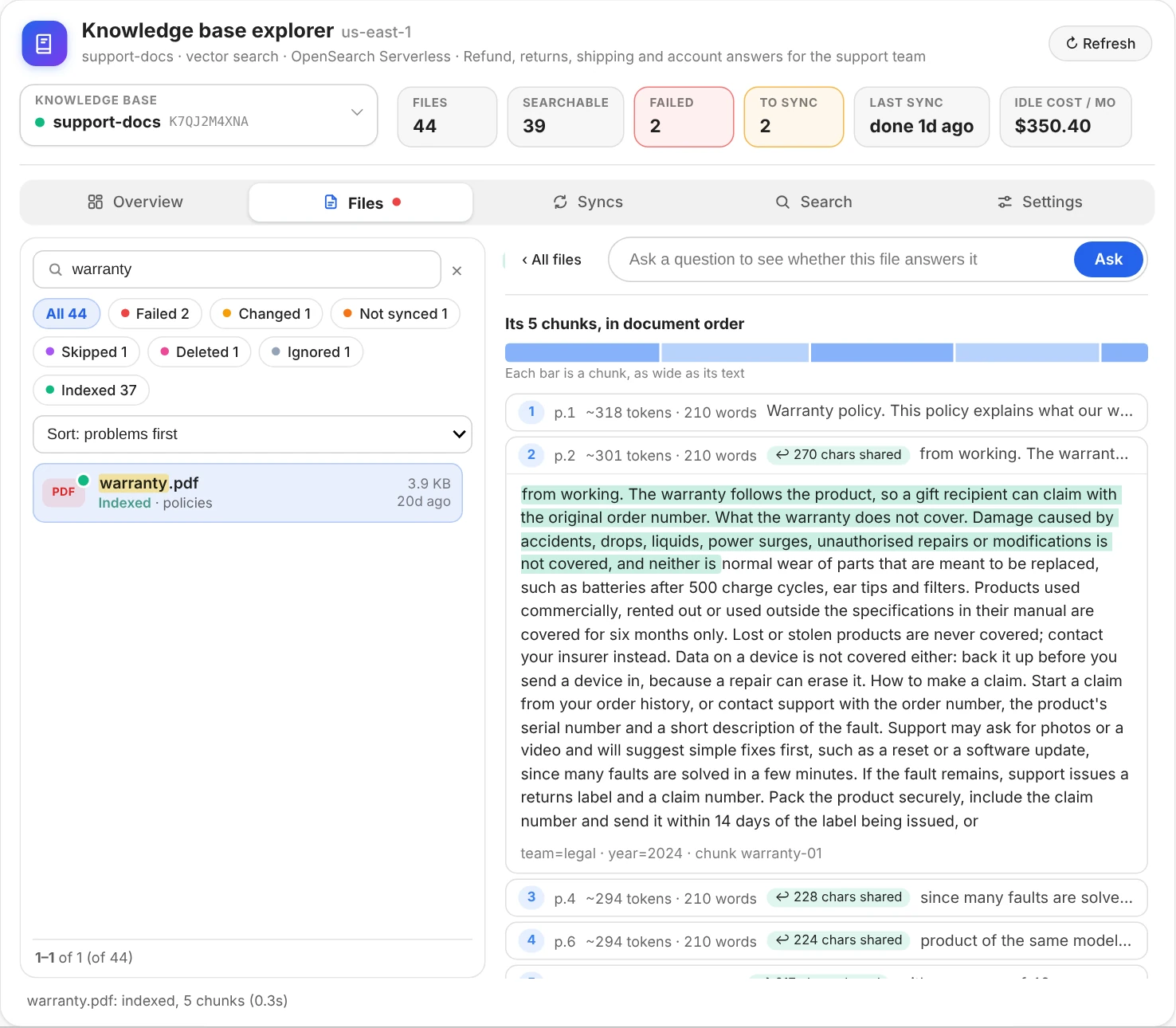
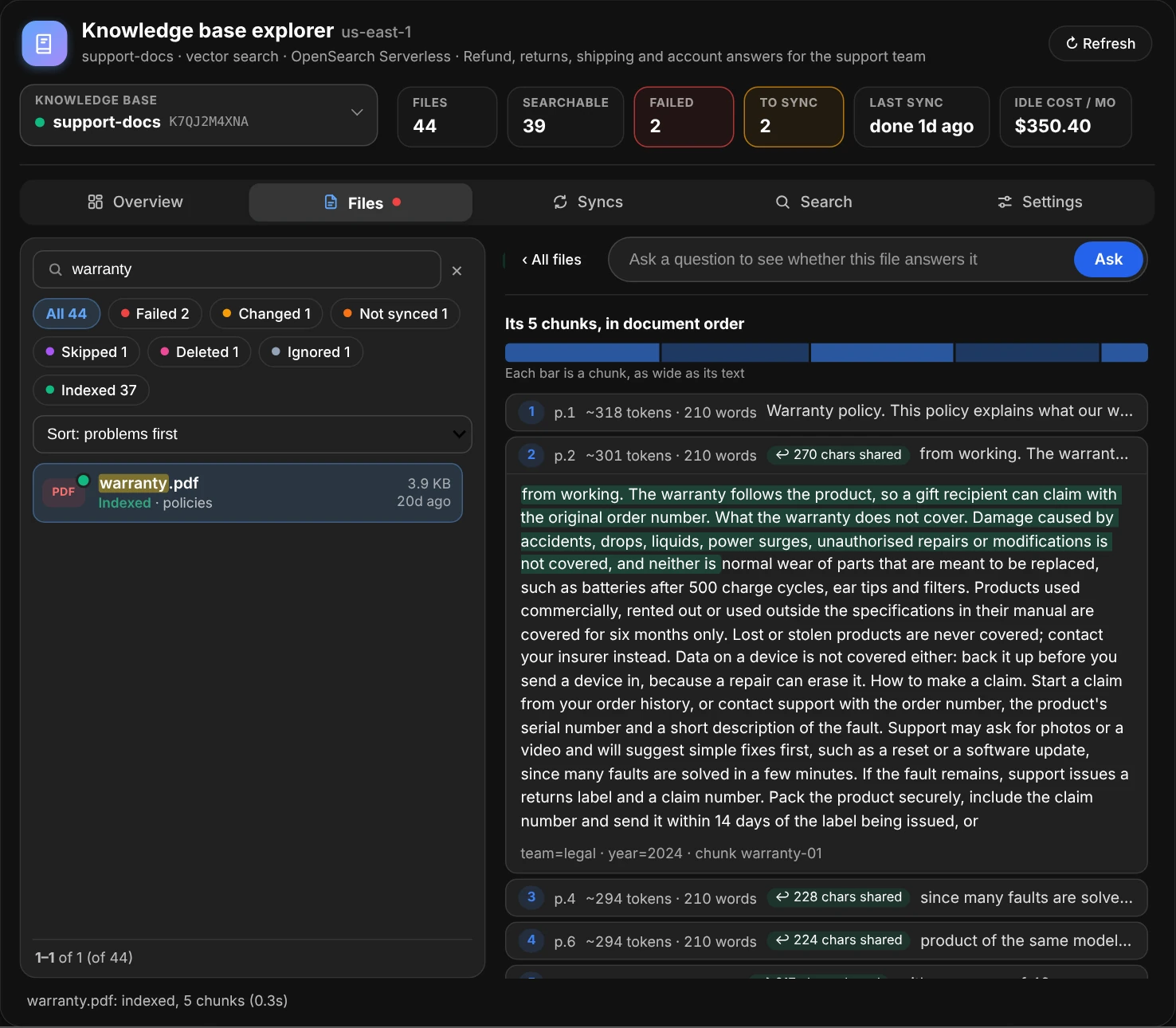
Its chunks in document order, one of them open: the green start is the text it shares with the chunk before it.
Last comes its metadata: the attributes in its .metadata.json next to the ones its chunks carry (what where= filters match), with what's wrong with the file when there is something: JSON that doesn't parse, a name Bedrock keeps for itself, an attribute its chunks don't have yet because the file changed after the last sync. The JSON as written, and Bedrock's record and the S3 object, are folded underneath.
A file that failed shows the step that failed in red, and the finding at the top says what usually fixes Bedrock's reason.
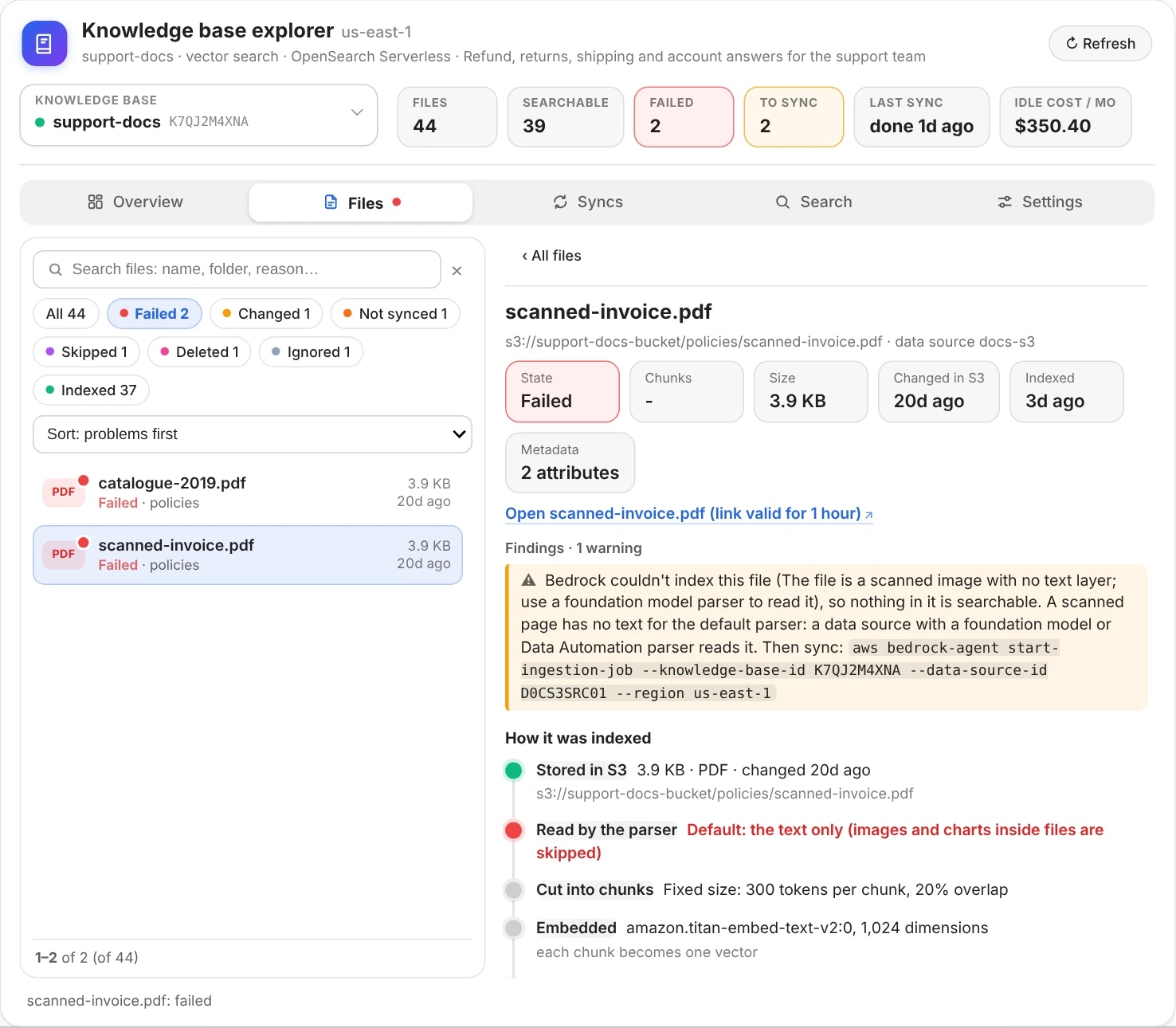
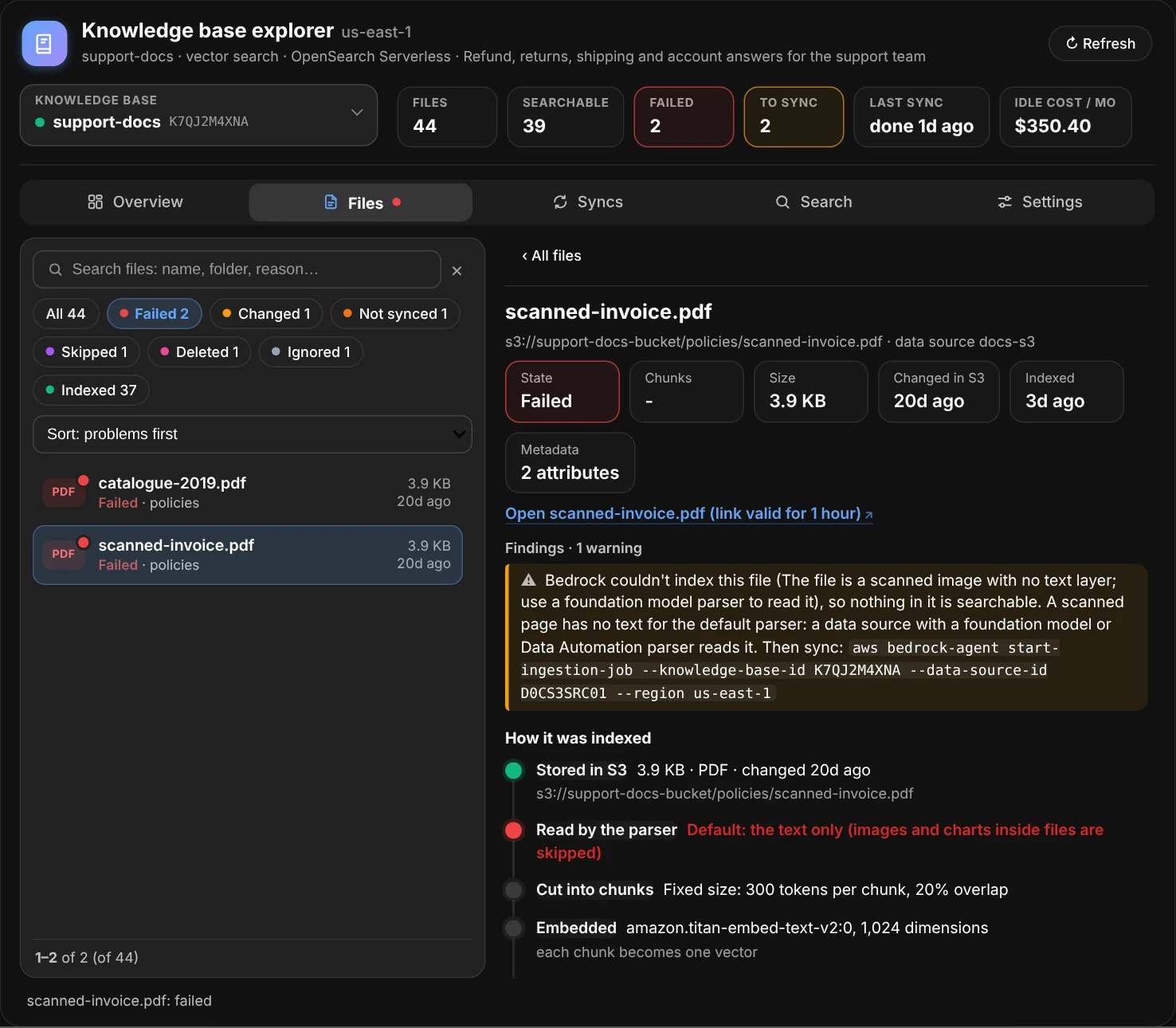
A failed file: Bedrock's reason, what usually fixes it, and the step that failed.
Does a question find this file?
On a file's page, type a question in Ask a question… and press Enter. The window searches the file on its own, and the whole knowledge base, and shows the file's best passages for the question and where its best one ranks among every file's. An answer only sees the top 5 passages, so a file that holds the answer but ranks #6 is never used: a finding says so, and what to change.
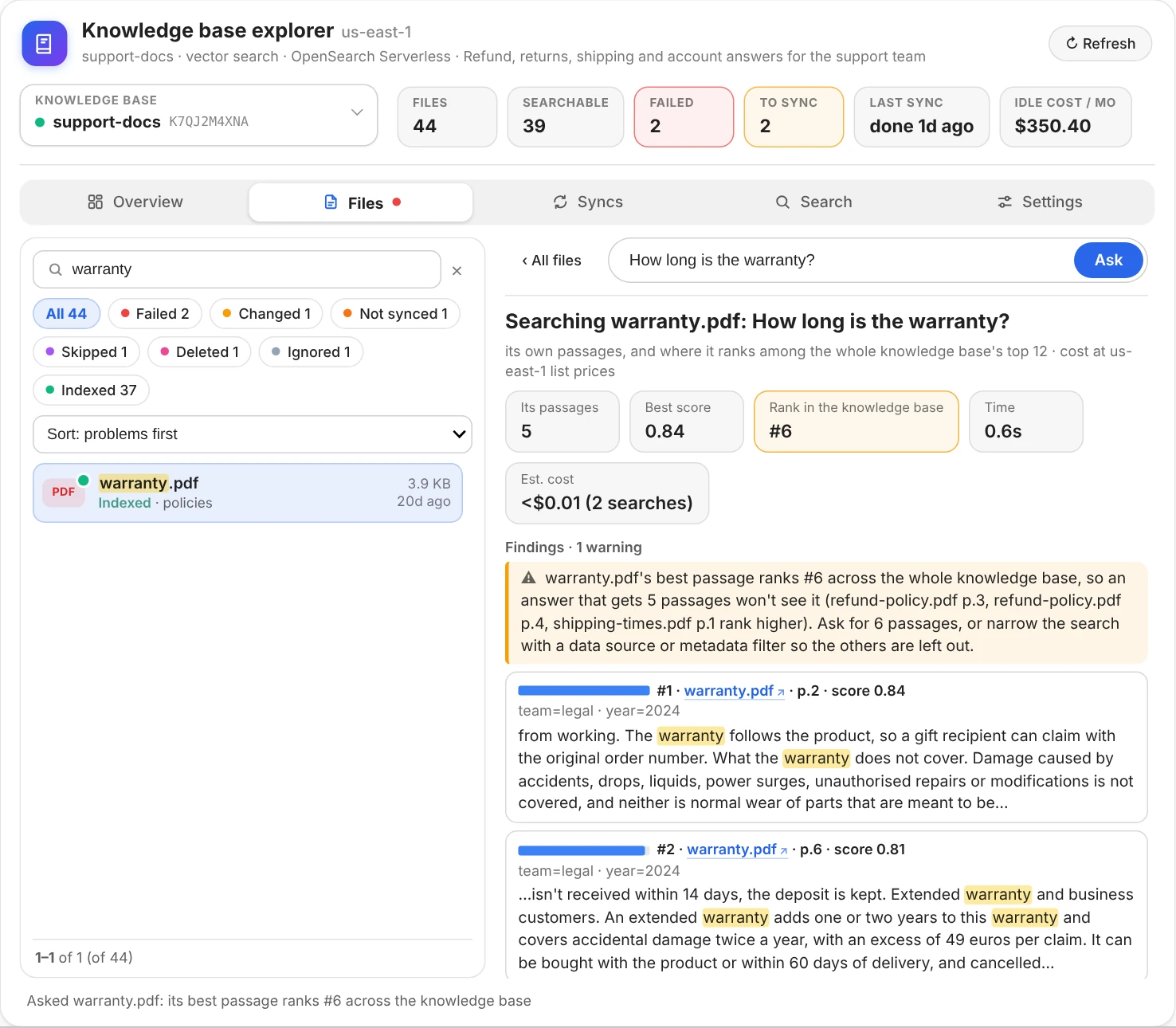
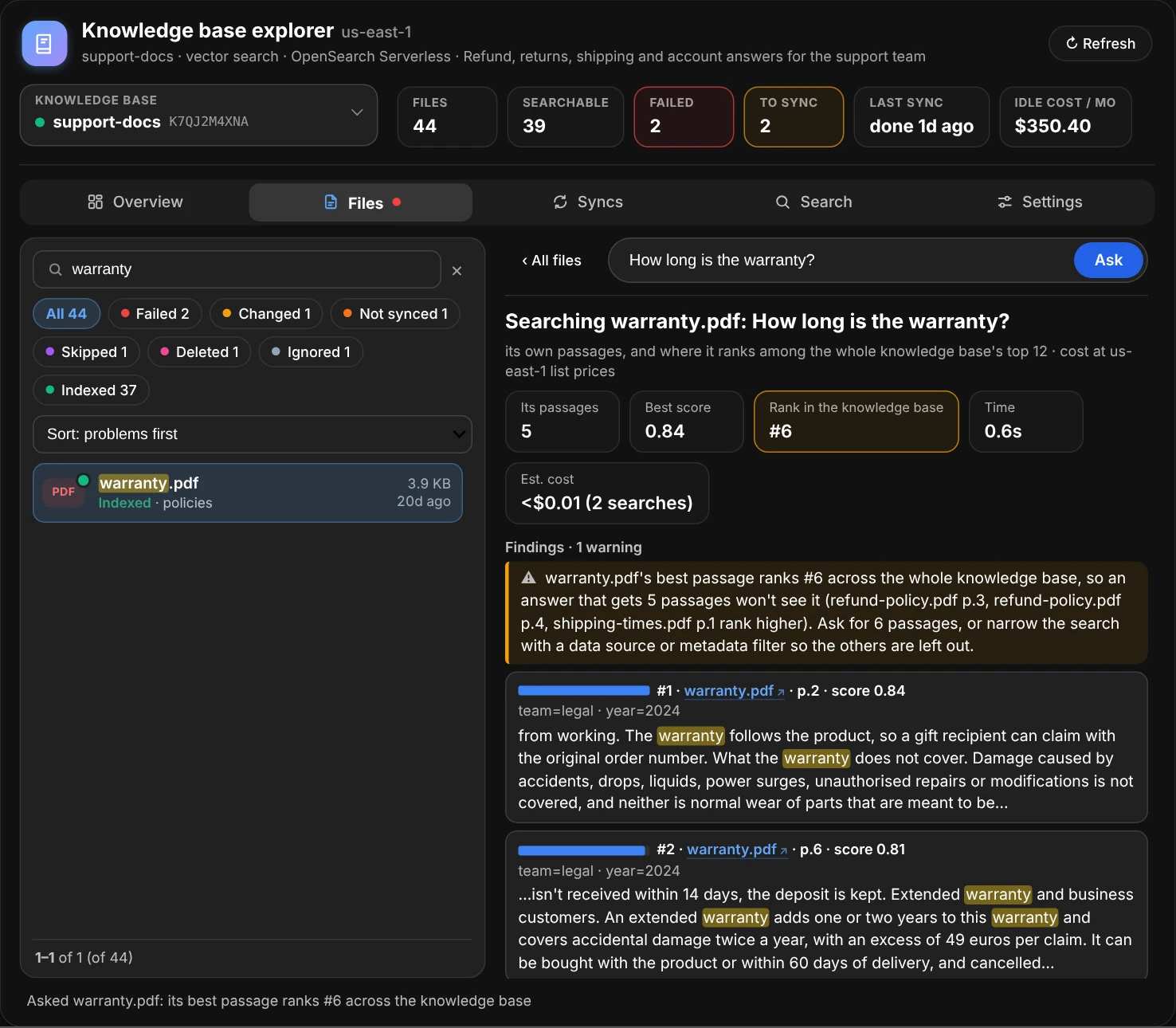
The file holds the answer, but five passages of other files rank above it.
Search, syncs and settings
- Search asks the knowledge base a question: its passages, best first, with their scores and the question's words highlighted. Pick how many passages, the search type (Semantic matches meaning, Hybrid also exact words such as error codes), a data source and a reranker. How payment-errors.md was indexed › under a passage opens its file's page in the Files tab.
- Syncs is the sync history as a timeline, newest first: which data source, when it ran and how long it took, what it read, added, changed, deleted and couldn't index, and why a sync failed.
- Settings has every setting in plain English: the embedding model and its dimensions, the vector store and which of its fields holds each part of a chunk, each data source's location, chunking, parser and deletion policy, and the tags. GetKnowledgeBase and GetDataSource as AWS returns them are folded at the end, with the AWS CLI commands that read them.
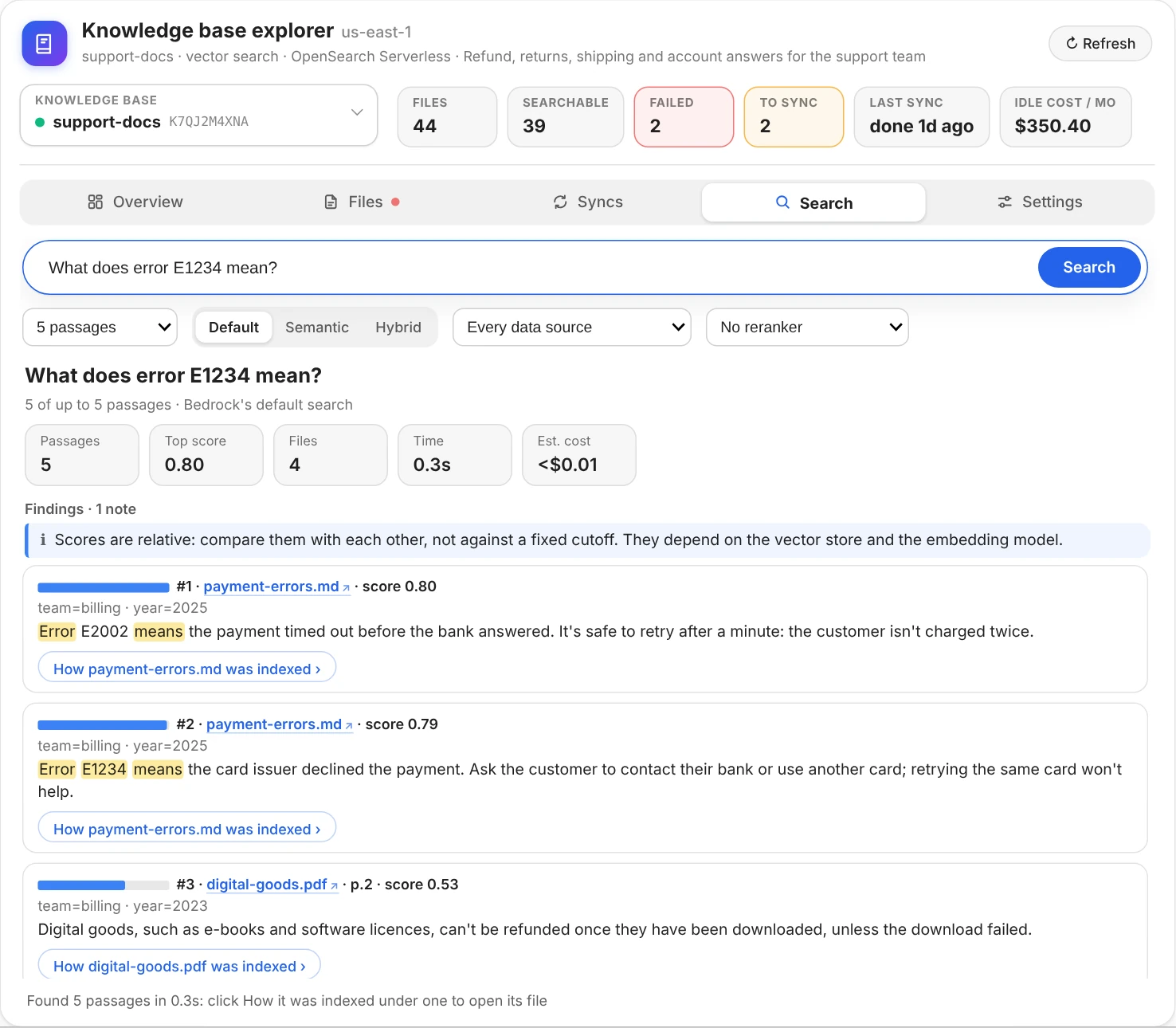
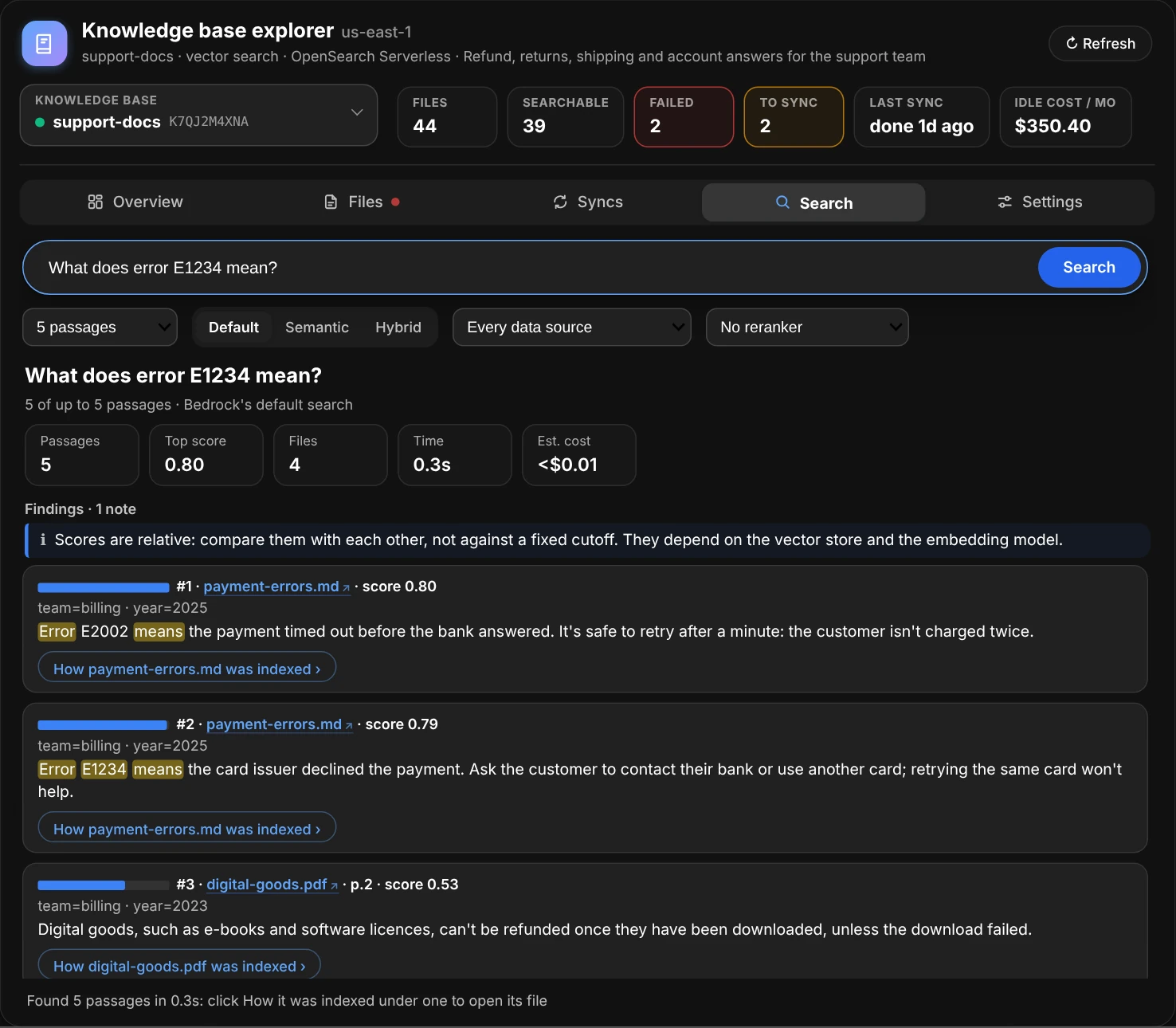
Search: each passage's How … was indexed › opens its file's page.
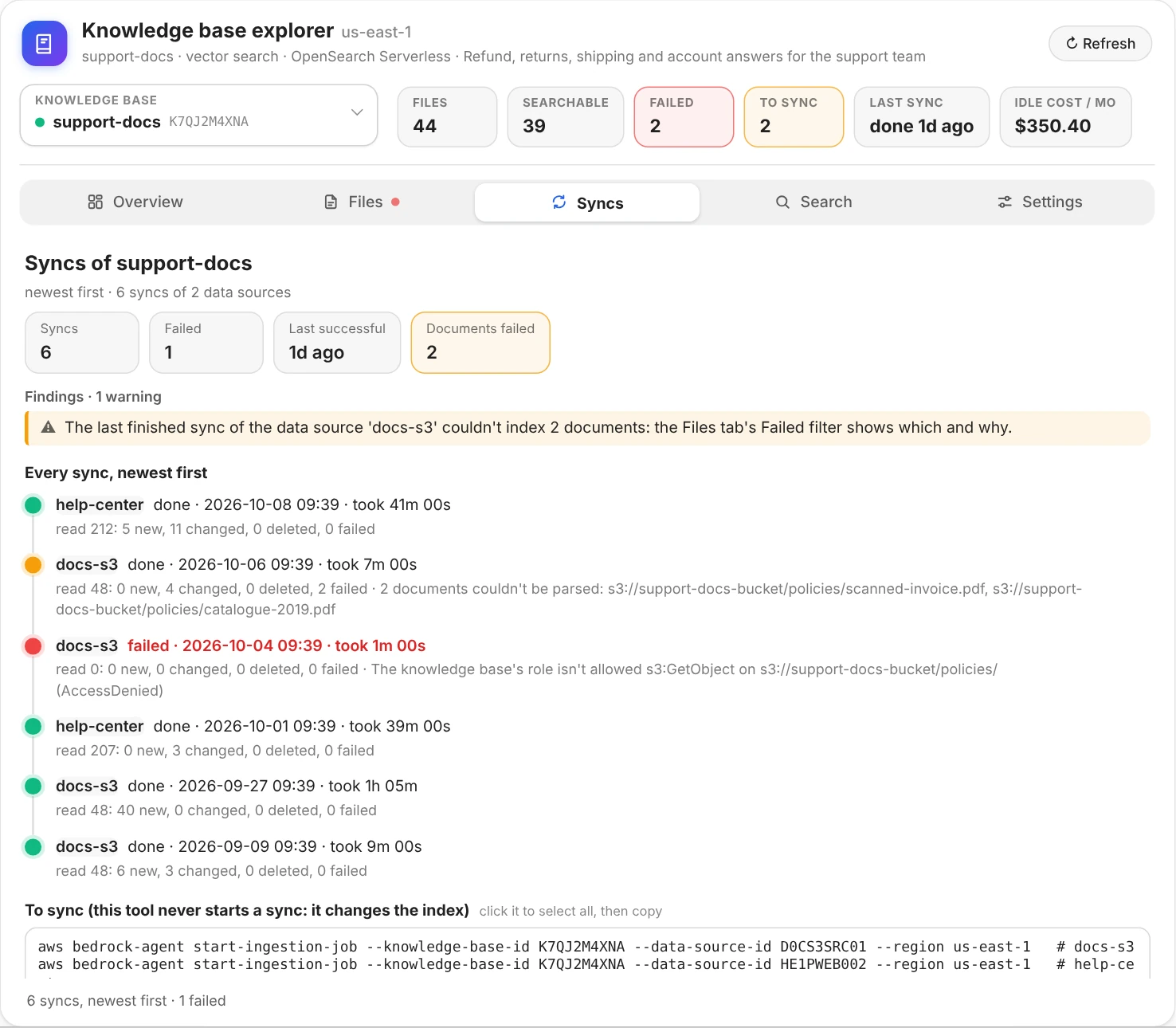
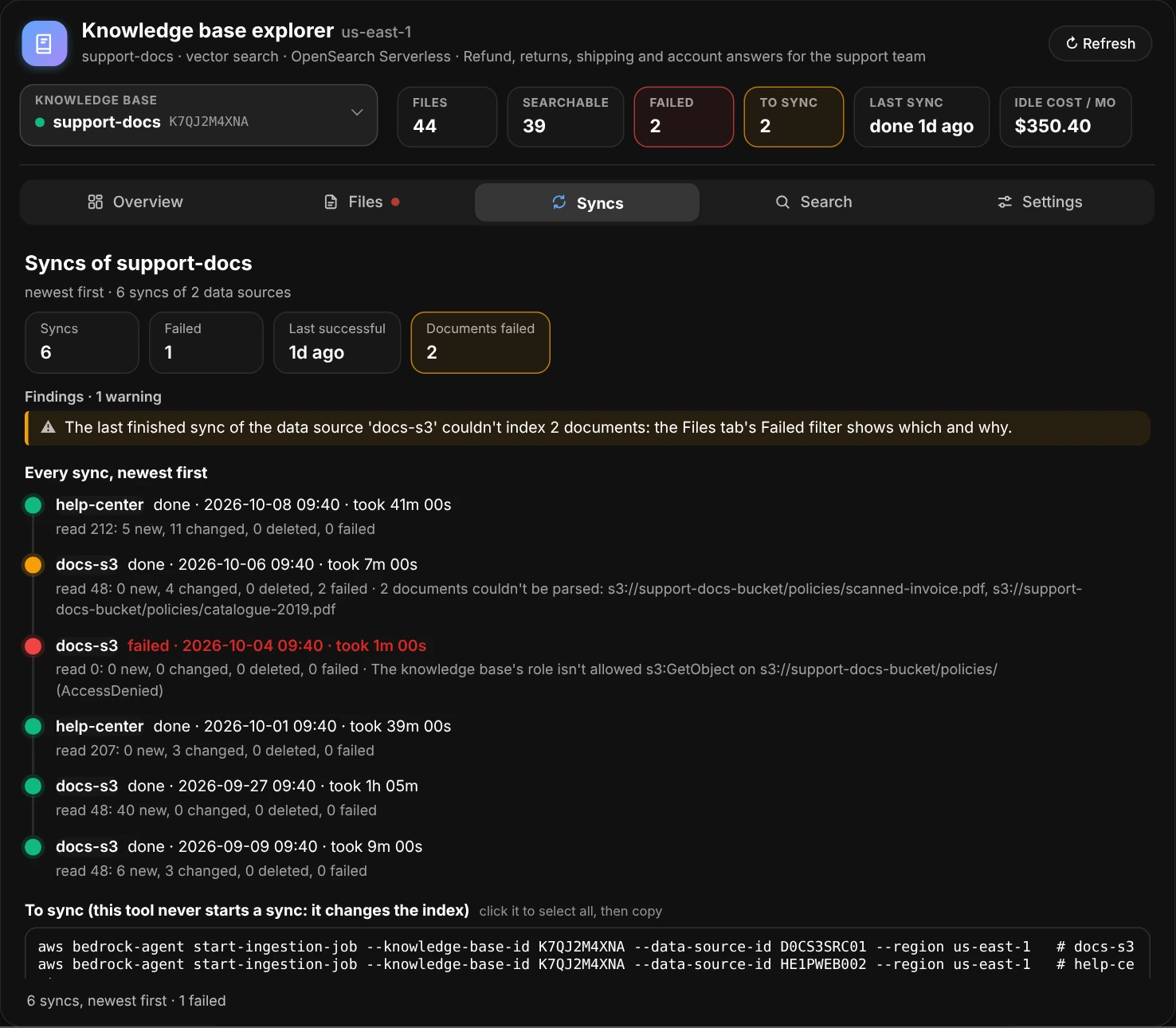
Syncs: the history as a timeline, with why a sync failed.
Everything is read in the background: a click shows what's known at once and fills in the rest as it arrives, and the window keeps answering meanwhile. explore() returns the window: x.inventory, x.info and x.chunks hold the data behind what's shown, x.file("faq.md"), x.search("...") and x.open("another-kb") do what the clicks do, and x.ui is a BedrockKBView for reports in other cells.
Your knowledge bases
Every knowledge base at a glance
kbs() describes every knowledge base in the region, in parallel: status, type, vector store, embedding model, how many data sources it has, how many documents the last successful sync read, when the last sync ran and how it went, and the vector store's estimated idle cost. Below the table, the warnings for each one, such as a data source that has never been synced or a sync that failed.
ui.kbs()
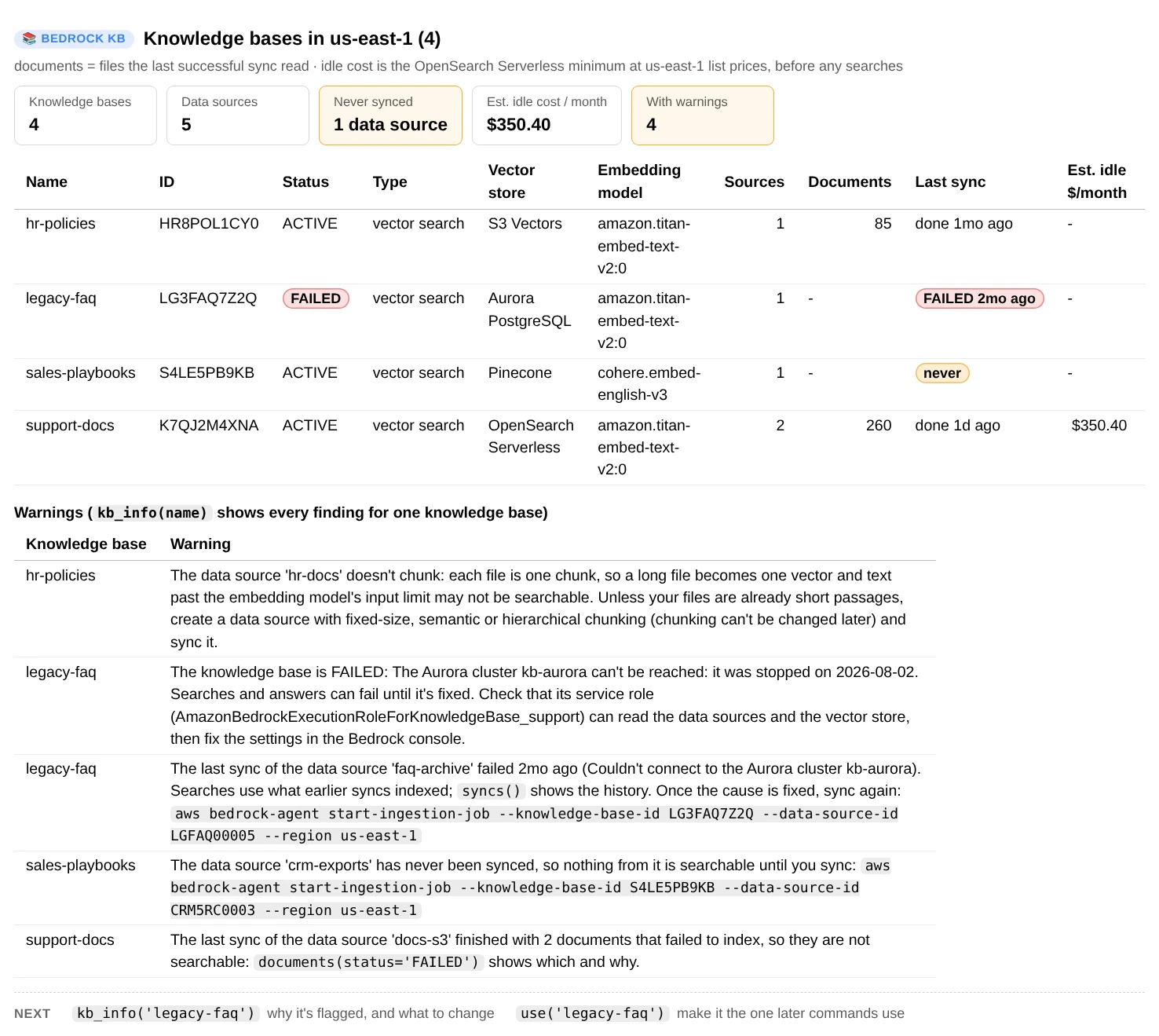
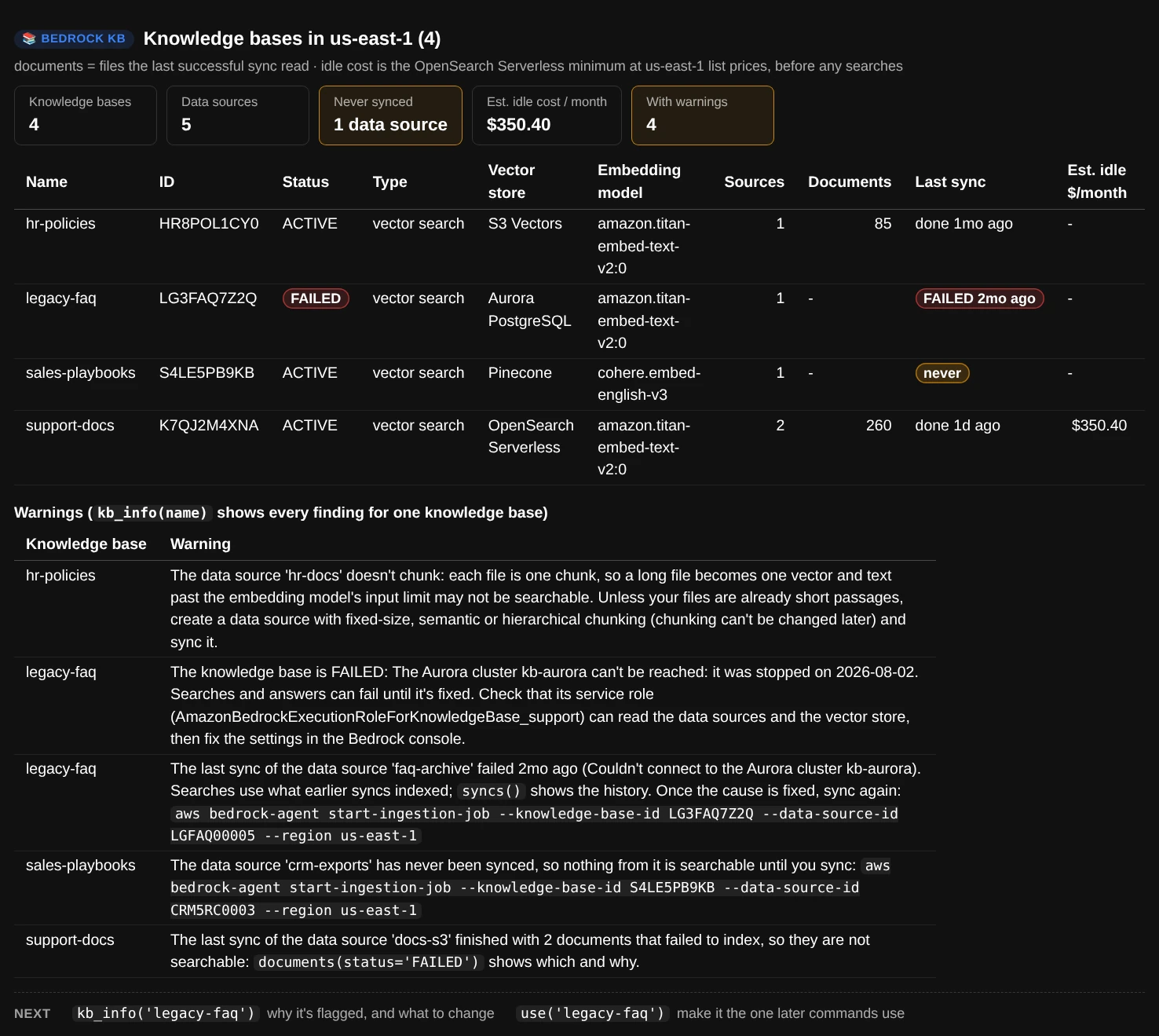
ui.kbs(): every knowledge base here has something to look at. The idle cost is estimated for OpenSearch Serverless only; the other vector stores show “-”.
One knowledge base in detail
kb_info() puts the numbers that matter in cards (status, vector store, embedding model and its dimensions, data sources, last sync, idle cost), then the findings, each with what to do about it. The settings follow in plain English:
- Vector store: for example “OpenSearch Serverless collection abc123, index kb-index”.
- Chunking: “Fixed size: 300 tokens per chunk, 20% overlap”, “Hierarchical: 1,500-token parents, 300-token children, 60-token overlap”, “Semantic: up to 300 tokens, split where the topic changes” or “None: each file is one chunk”.
- Parsing: the default parser reads the text only; a foundation model or Bedrock Data Automation also reads tables, charts and images.
- When deleted: whether a data source's chunks are removed with it (
DELETE) or stay in the vector store and keep turning up in answers (RETAIN).
ui.kb_info("support-docs")
ui.kb_info()                                 # the default knowledge base
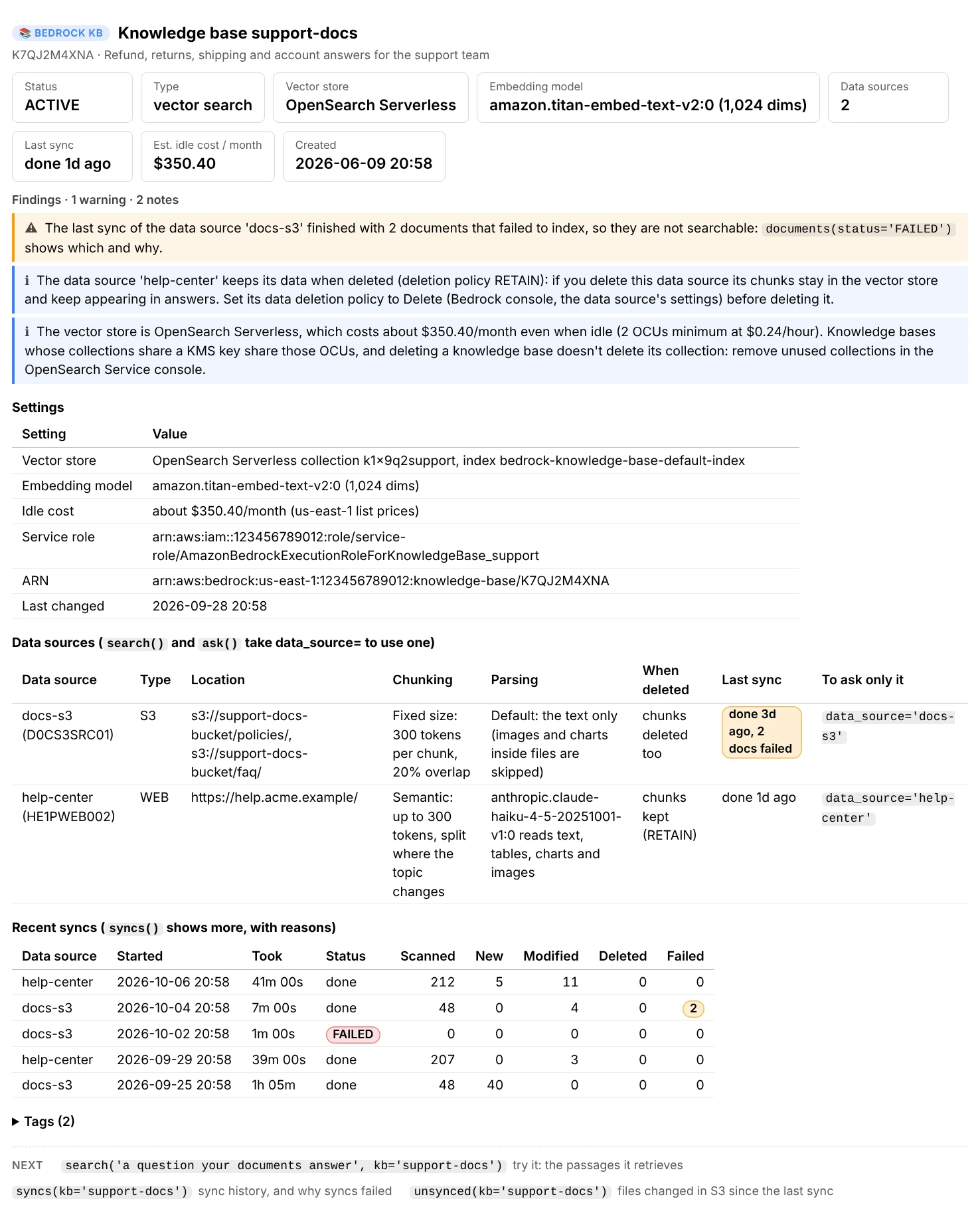
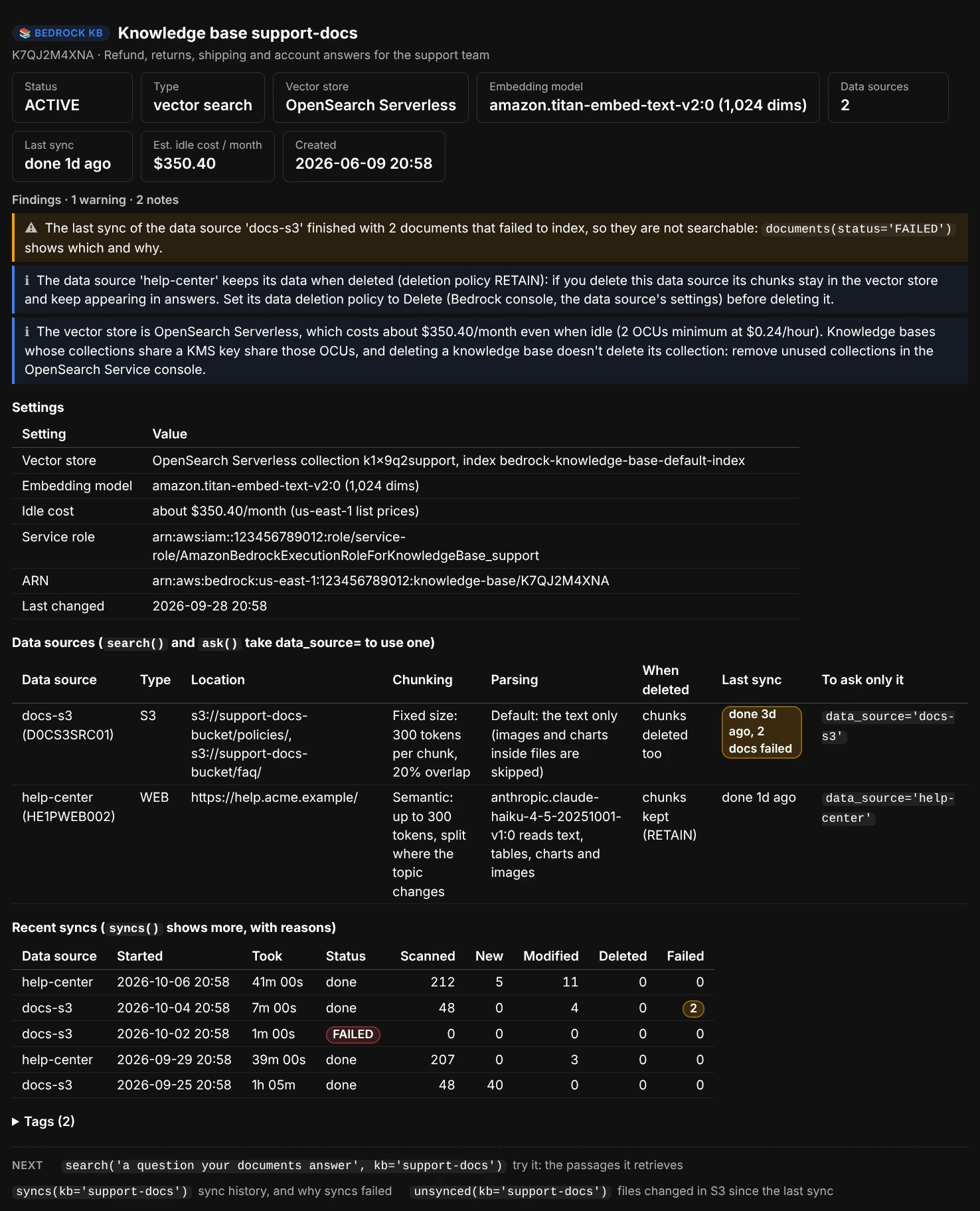
ui.kb_info("support-docs"): the findings come first, each with what to do next. Below them, each data source's chunking, parsing and deletion policy in plain English.
Findings cover a failed knowledge base, data sources that were never synced, the last sync failing or leaving documents unindexed, no metadata files (so where= filters match nothing), chunking that is off or has no overlap, the RETAIN deletion policy, and what an OpenSearch Serverless store costs while idle. A section the notebook's role can't read shows as ? (AccessDeniedException) and a note; the rest of the report still renders.
Syncs and documents
A knowledge base only knows what its last sync indexed. Three commands show how far that is from the files you have. None of them starts a sync: where one is needed, they show the command to run and the boto3 call to copy.
ui.syncs()                                   # sync history: counts, how long, why it failed
ui.syncs(data_source="docs-s3", n=30)        # one data source, further back
ui.documents(status="FAILED")                # documents that failed to index, with the reason
ui.unsynced()                                # S3 files added or changed since the last sync
syncs()lists each sync with when it started, how long it took, its status, and how many documents it scanned, added, re-indexed, removed and failed on, with the reason a sync failed. Findings group repeated failures and their reasons: when the last three syncs failed the same way, syncing again won't help until the cause is fixed.documents()counts documents by status (indexed, failed, pending ...) and lists the ones that aren't indexed with Bedrock's reason, such as an encrypted PDF or a file that's too large. Bedrock keeps document status for S3 and custom data sources only; for the others,syncs()has the failed counts.unsynced()lists the S3 bucket (and the data source's inclusion prefixes) and compares each file's modification time with the start of the last successful sync. Metadata files are counted apart: a changed.metadata.jsonneeds a sync too, before filters see the new values.
aws bedrock-agent start-ingestion-job --knowledge-base-id KBID123456 --data-source-id DSID123456 --region us-east-1
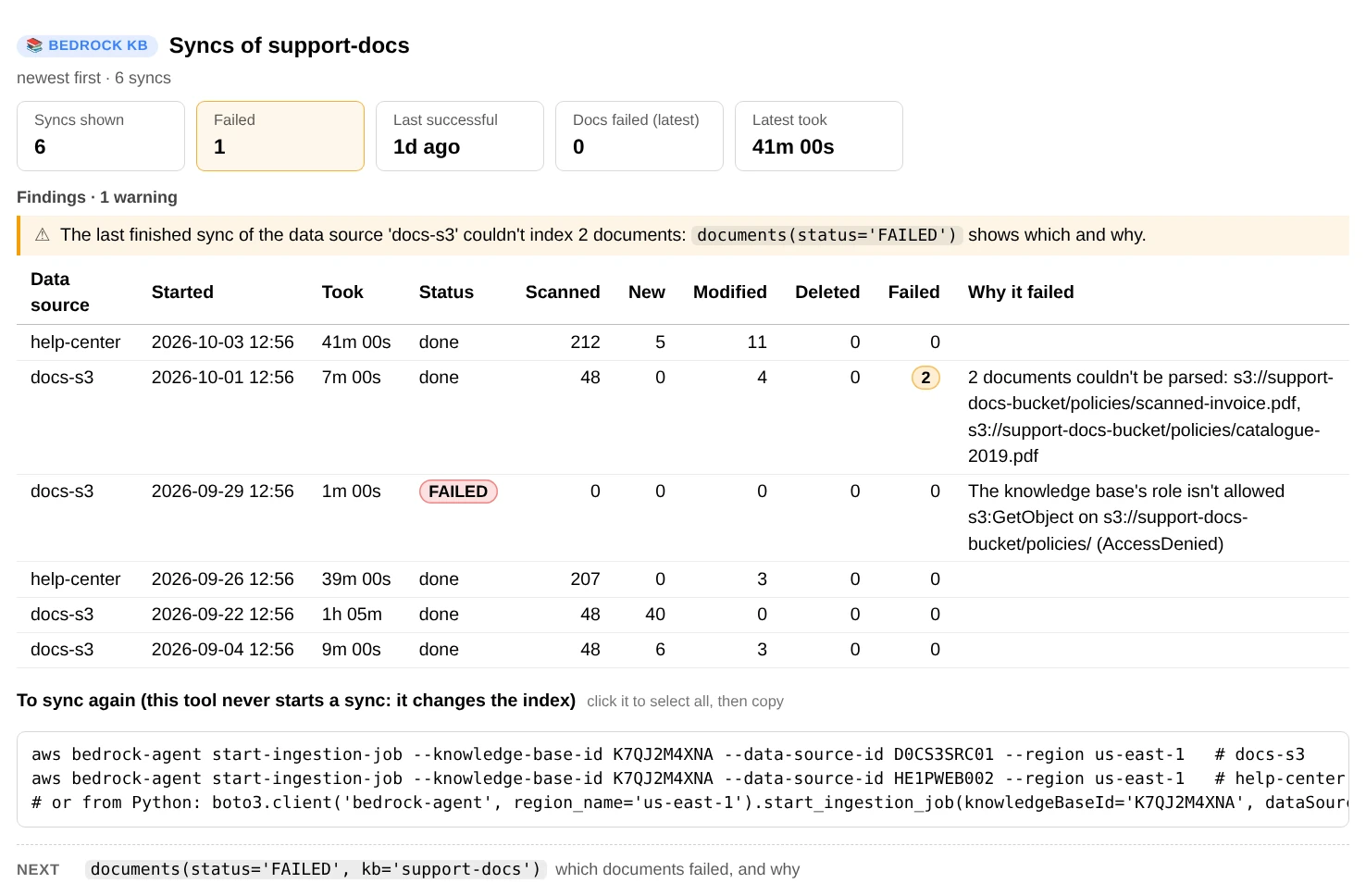
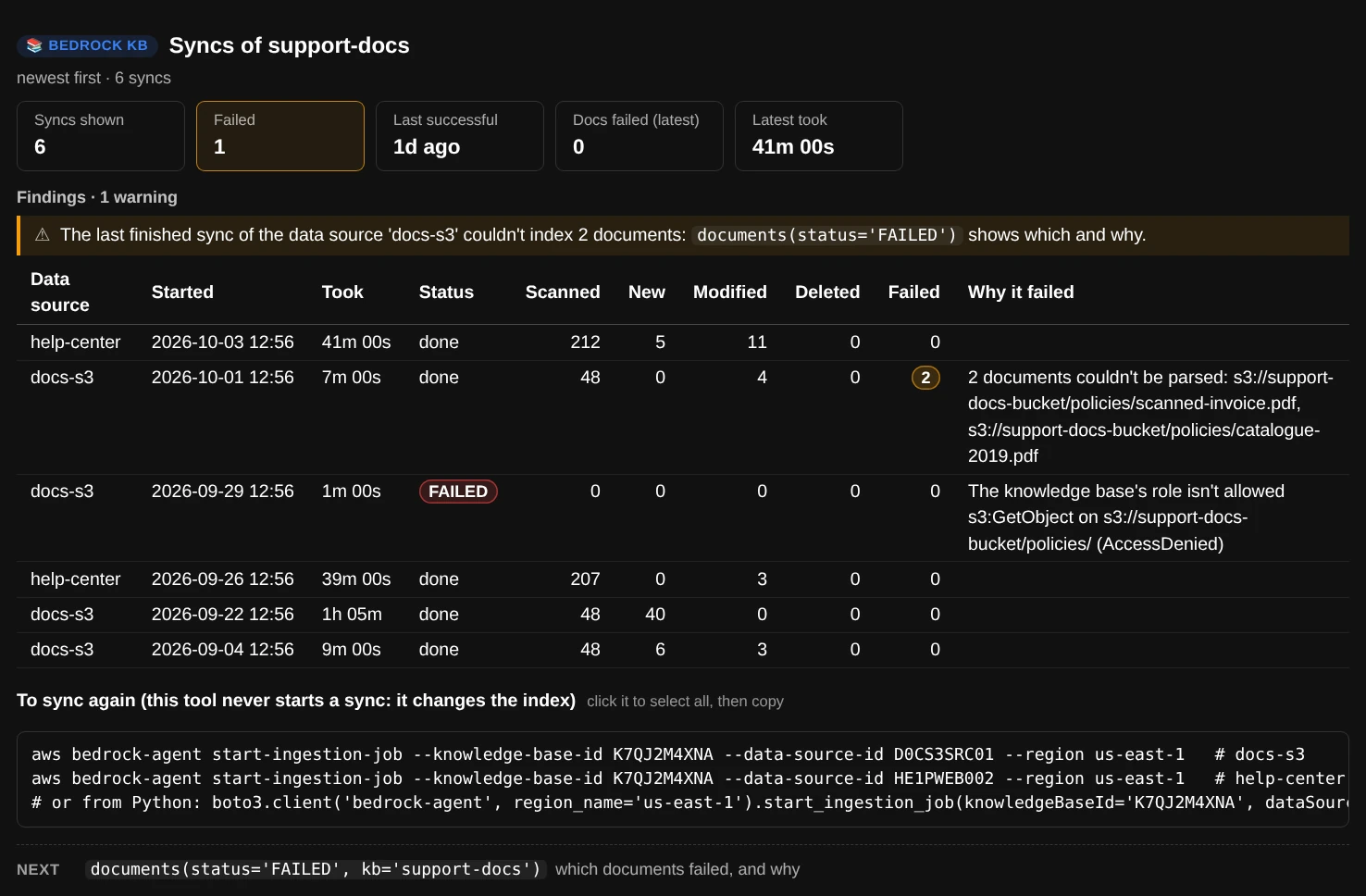
ui.syncs("support-docs"): why a sync failed, in the same row, and the command that starts the next one. You run it; the tool never does.
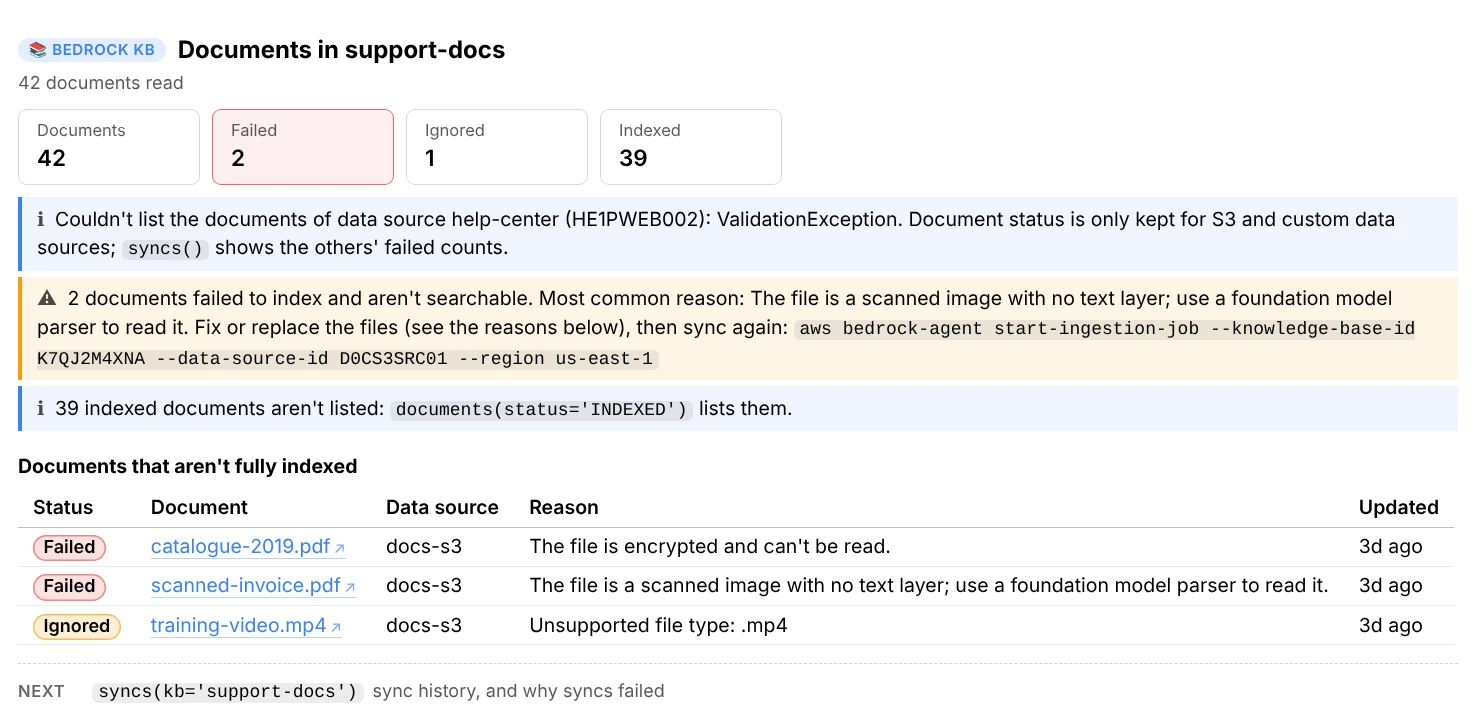
ui.documents("support-docs"): without status= it lists only the documents that aren't indexed, with Bedrock's reason for each.
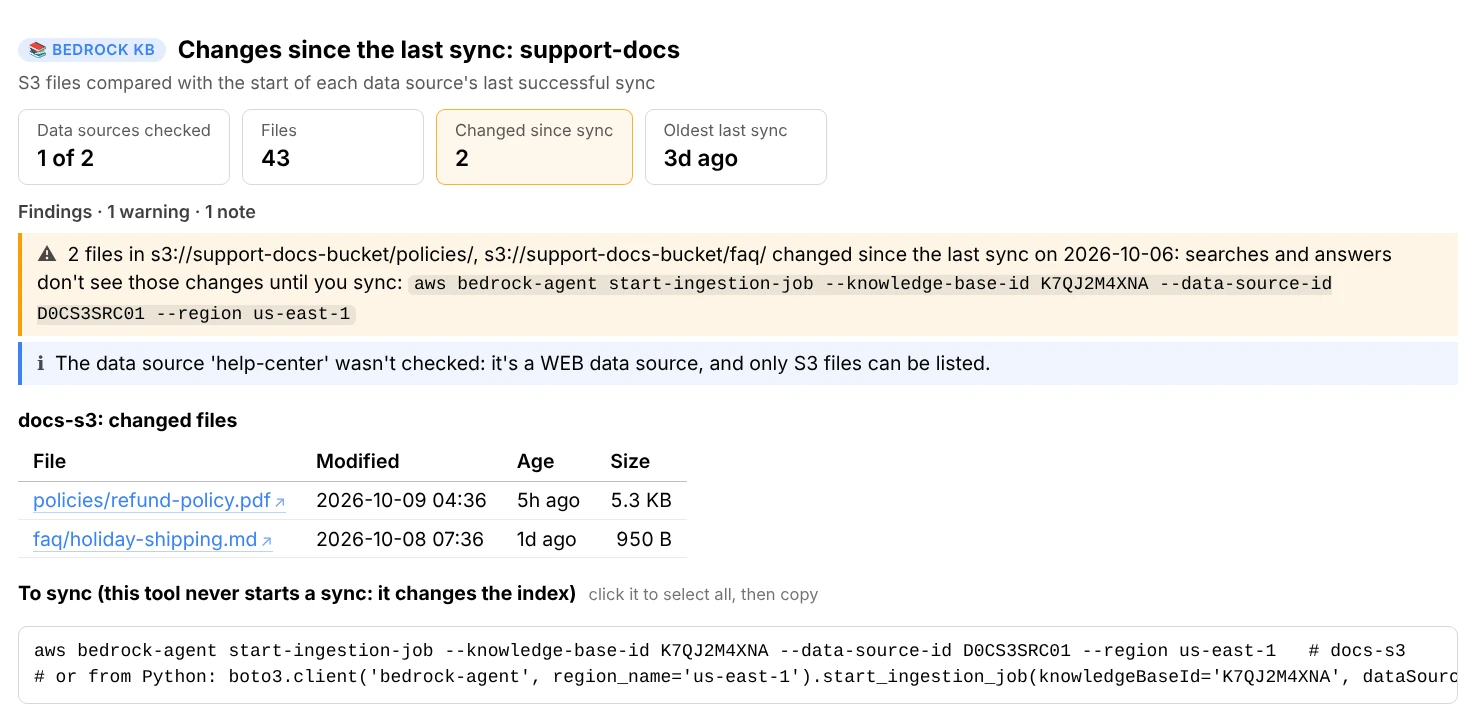
ui.unsynced("support-docs"): two files changed after the last sync, so searches and answers don't see those changes yet.
Every file, as reports
The explorer's Files tab is three commands underneath, which print the same as reports:
ui.files()                                   # every file next to Bedrock's record of it, problems first
ui.files(status="failed")                    # only these: failed, changed, new (not synced yet), skipped, deleted...
ui.files(match="refund")                     # files whose name, path or reason holds this
ui.file("refund-policy.pdf")                 # how one file was indexed: steps, chunks in order, metadata, what to fix
ui.file("s3://support-docs-bucket/policies/refund-policy.pdf")   # a name, its path in the bucket, or its s3:// path
ui.search_file("refund-policy.pdf", "How long do refunds take?")  # does the question find it, and where it ranks
files() reads Bedrock's document list next to the bucket's files, so it also catches what documents() alone can't: files added after the last sync, files the sync skipped without a record, and files deleted from S3 that answers can still cite. It ends with the command that syncs each data source a sync would change. A name that several files share asks which one you mean, with their paths.
Search
search() runs Bedrock's Retrieve for a question and shows the passages it returns, best first: a score bar relative to the top result, the file and page, the part of the passage with the most of the question's words (highlighted in Jupyter), and the passage's own metadata.
ui.search("How long do refunds take?")
ui.search("How long do refunds take?", n=10)              # up to 100 passages
ui.search("error E1234", search_type="HYBRID")            # meaning and keywords, where the store supports it
ui.search("refund window", rerank=True)                   # re-order with a reranking model (Cohere Rerank 3.5)
ui.search("refund window", data_source="faq")             # one data source only (see below)
ui.chunk(2)                                               # result #2 in full, with its metadata and IDs
ui.link(2)                                                # a link that opens result #2's file in a new tab
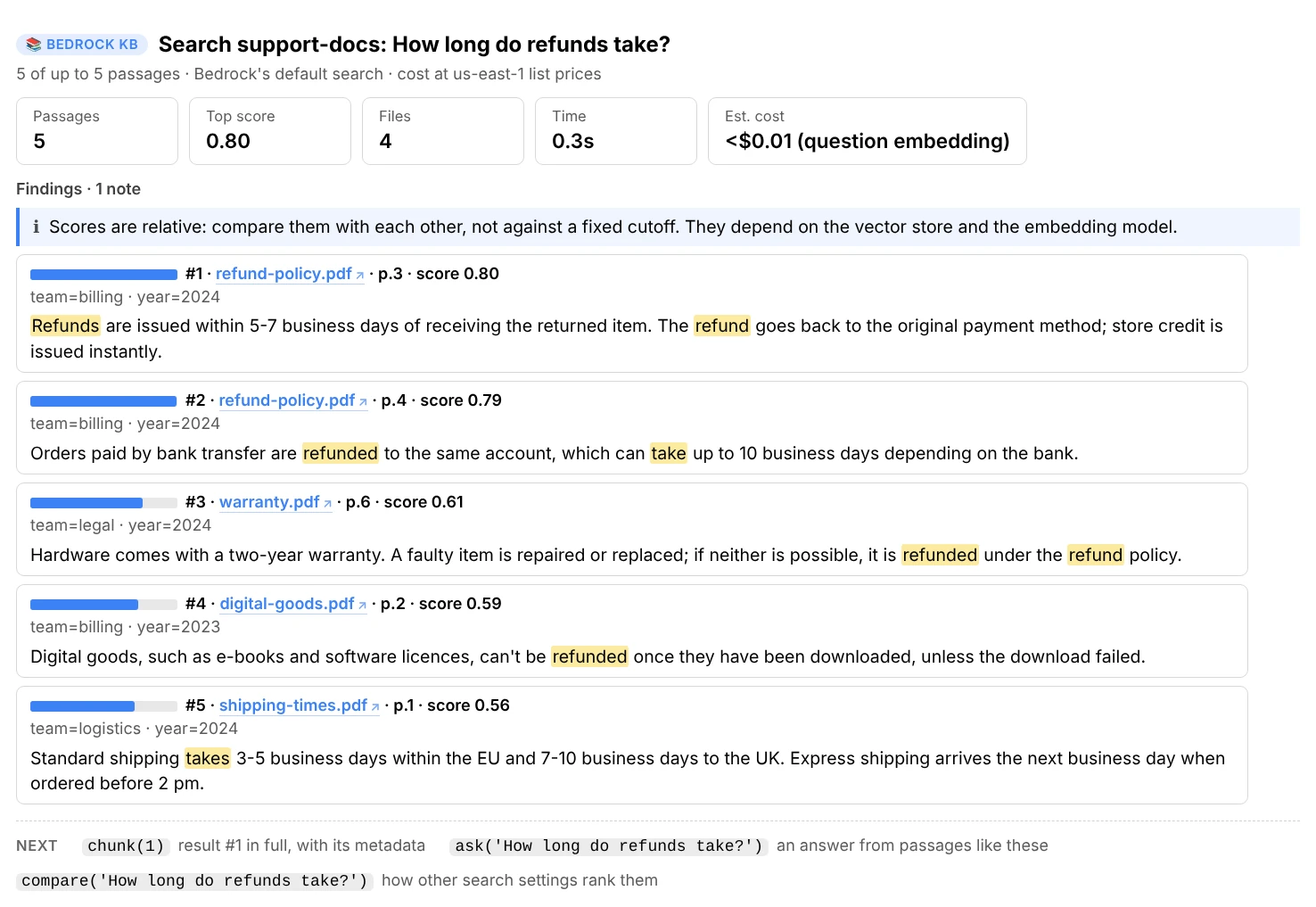
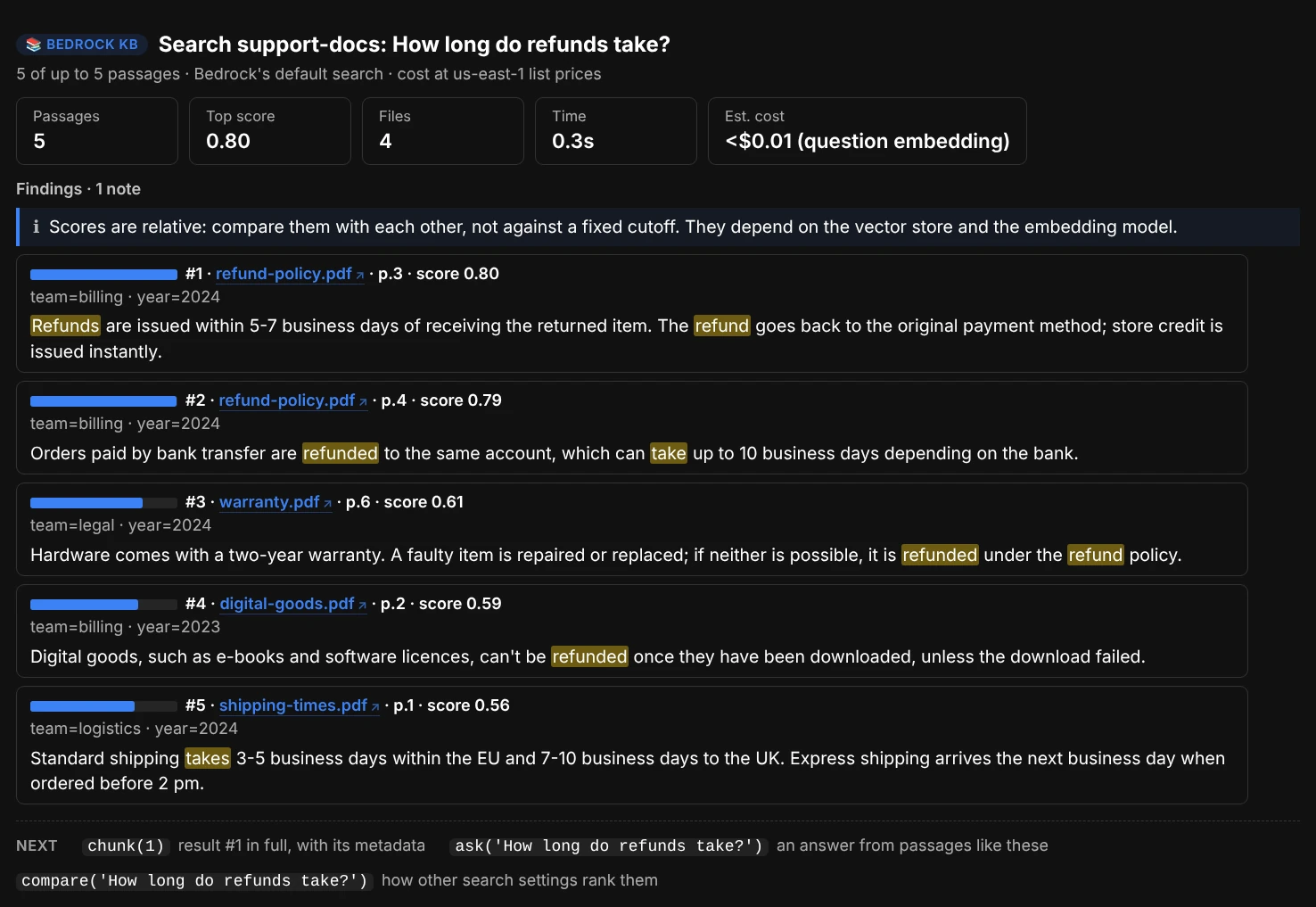
ui.search("How long do refunds take?"): two passages from the refund policy, then three weaker ones. The words from the question are highlighted.
Scores are relative: compare them with each other, not against a fixed cutoff, since they depend on the vector store and the embedding model. The findings say what to try next:
- Nothing came back: check the filter, whether the data sources are synced, or try a larger
n=. - A code in the question is in no passage (an error code, a SKU): semantic search matches meaning, not exact strings; try
search_type="HYBRID". - Every passage comes from one file, passages repeat each other word for word (duplicate files), or most passages are very short (chunking too small).
chunk(n) shows result n of the last search (or source n of the last answer) in full, with its metadata, chunk ID and data source, a link that opens its file, and the S3View().preview("s3://…") call that previews the whole file in the notebook with s3.py.
Open a source's file. Each file name in a search, an answer's sources, compare(), documents() and unsynced() is a link (↗) that opens the file in a new browser tab, a PDF at the passage's page, so you can check what a passage says in context. For a file in S3 it's a presigned link: signed in the notebook with your credentials (no AWS call), it works for an hour and only if those credentials may read the file (s3:GetObject). The browser shows PDFs, pictures, text and HTML; Word and Excel files download. Web, Confluence, SharePoint and Salesforce sources link to their page. link(n) gives the link on its own: in text mode, where reports don't show links, or for longer than an hour (link(2, expires=86400), up to 7 days). link("refund-policy.pdf") and link("s3://bucket/key") work too. Anyone you send a link to can open the file until it expires.
Ask
ask() answers a question from the knowledge base and shows the answer with [1][2] markers after each claim, linked to the sources below it. The cards say how much of the answer the citations cover (“grounded”), how many sources it used, the model, tokens, cost and time.
ui.ask("How long do refunds take?")
ui.follow_up("And for digital goods?")                     # same session
ui.ask("How long do refunds take?", model="sonnet", n=10)
ui.ask("How long do refunds take?", engine="converse")     # exact tokens and cost
ui.ask("How long do refunds take?", data_source="faq")     # from one data source only
ui.chunk(1)                                                # source [1] in full
![ask(): an answer about refund times with a [1] and a [2] marker, 77% grounded because its last sentence cites nothing, cards for sources used, model, estimated tokens, cost and time, and the two cited passages from refund-policy.pdf](images/bedrock-ask-light.webp#only-light)
![ask(): an answer about refund times with a [1] and a [2] marker, 77% grounded because its last sentence cites nothing, cards for sources used, model, estimated tokens, cost and time, and the two cited passages from refund-policy.pdf](images/bedrock-ask-dark.webp#only-dark)
ui.ask("How long do refunds take?"): cited spans are shaded and link to their source. The last sentence cites nothing, so the answer is 77% grounded. Tokens are an estimate here, because RetrieveAndGenerate doesn't report them.
An answer the model wrote in markdown is laid out as such: lists, bold, tables and code blocks, with the cited spans still shaded inside them. Nothing in it runs as HTML, and its links open only web pages and email addresses. In a terminal, the markdown is printed as written, with code and tables left unwrapped.
Two ways to generate
-
engine="kb"(default)Bedrock's managed RetrieveAndGenerate: it retrieves, prompts the model and returns the citations, and
follow_up()keeps its session. It doesn't report tokens, so tokens and cost are estimated from characters. A customprompt=must contain$search_results$. -
engine="converse"Retrieve, then the model through Bedrock Converse: exact token counts and cost, any model, and your own
prompt=with{sources}and{question}. The passages go in as numbered sources the model must cite as[n].
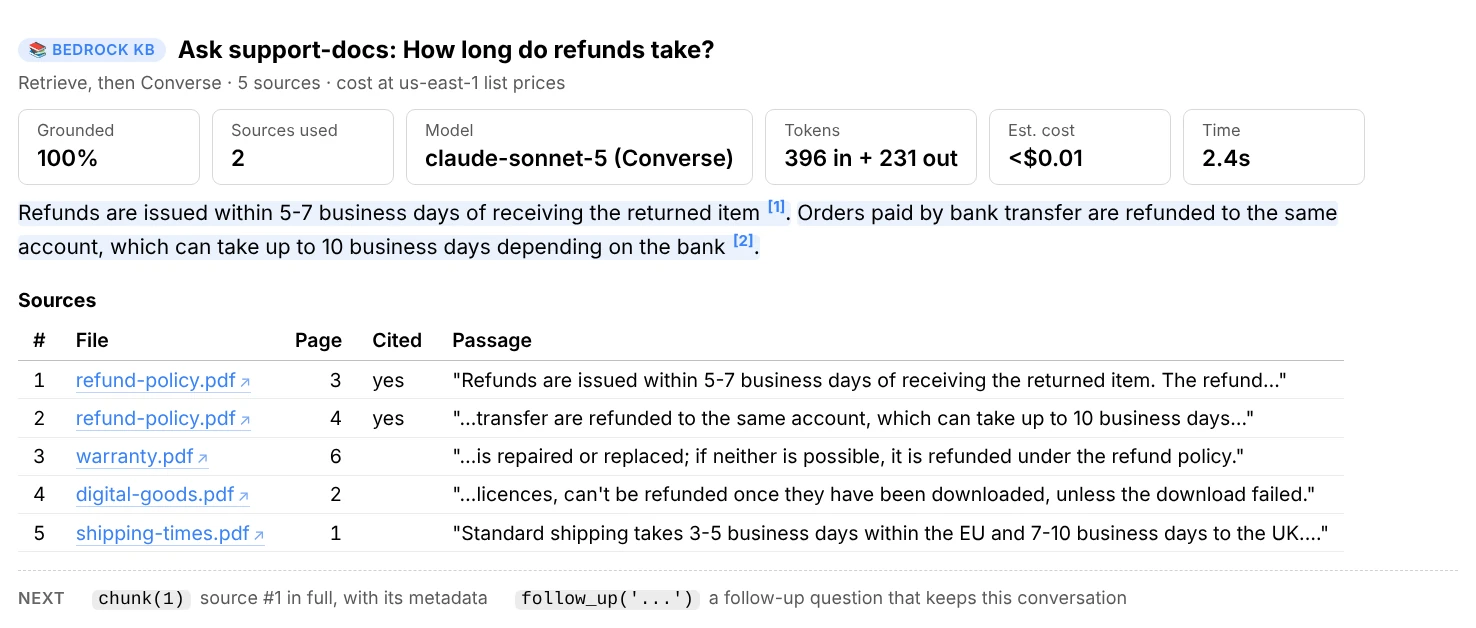
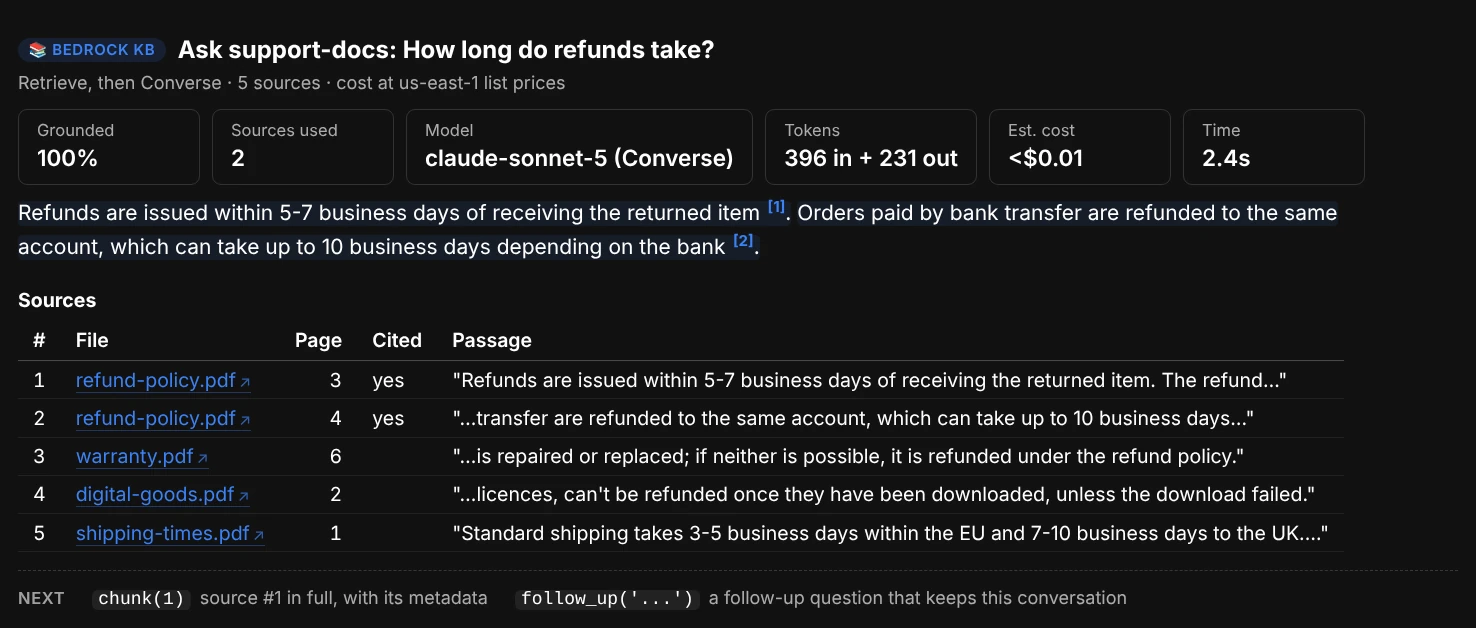
ui.ask("How long do refunds take?", engine="converse", model="sonnet"): exact token counts, and the Cited column shows which of the passages the model used.
With engine="converse", the sources are sent as data, never as instructions (a document that says “ignore your instructions” is just text), and the model is told to say plainly when they don't hold the answer. bedrock_kb.DEFAULT_PROMPT is the template it uses; copy it to write your own.
from aws_analyzer import bedrock_kb
print(bedrock_kb.DEFAULT_PROMPT)

MY_PROMPT = """Sources:
{sources}

Answer in two sentences for a customer, citing sources as [n]: {question}"""
ui.ask("How long do refunds take?", engine="converse", prompt=MY_PROMPT)
Choosing a model
model= takes a model ID or ARN, an inference profile ID, or a short name: "opus", "sonnet", "haiku", "claude-opus-5", "nova-pro". The default is Claude Haiku 4.5, called through the region's inference profile when it can't be called on demand. models() lists the text models you can use in the region, the ID to pass, how each is called and its price per million tokens.
ui.models()
ui.models("claude")
ui = BedrockKBView(BedrockKBAnalyzer(default_model="sonnet"))   # a different default
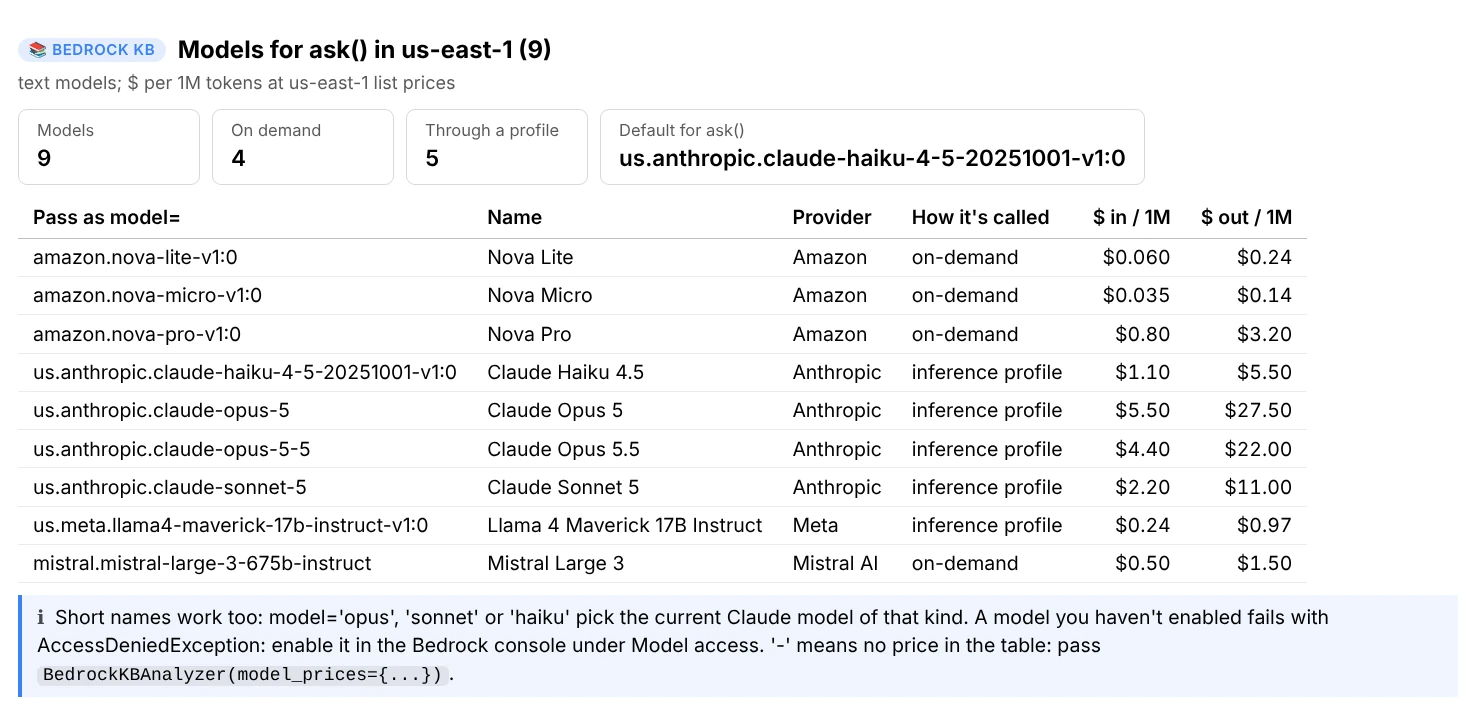
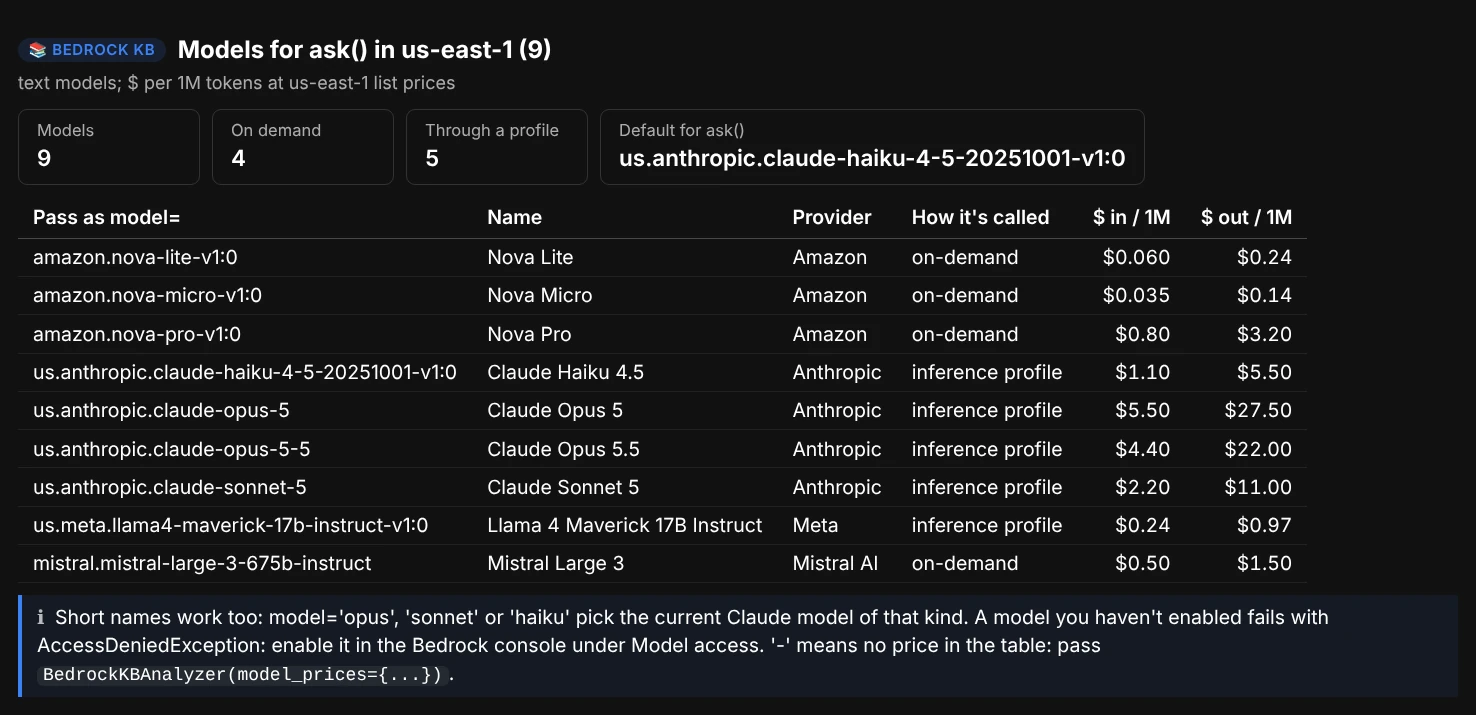
ui.models(): the ID to pass as model=, how each model is called, and what it costs per million tokens.
The answer's findings flag an answer that cites nothing (it may be the model's own knowledge), one where less than half is backed by a citation, Bedrock's default “unable to assist” reply (the passages didn't hold the answer: run search() on the question), a guardrail stepping in, and an answer cut off at max_tokens.
Ask one data source
A knowledge base can have several data sources: an S3 bucket of policies, a crawled help site, a Confluence space. data_source= points a question at one of them. search, ask, compare and evaluate take its name (in any case) or its ID, or a list of them, and follow_up() keeps it for the rest of the conversation:
ui.search("refund window", data_source="faq")                   # passages from the faq data source only
ui.ask("How long do refunds take?", data_source="policies")     # an answer from the policies only
ui.follow_up("And on the help site?", data_source="help-site")  # the next question searches another one
ui.follow_up("Anything else?", data_source="all")               # back to every data source
Bedrock tags every chunk with its data source's ID (x-amz-bedrock-kb-data-source-id), so this needs no metadata files, and it works together with where=: both must match. kb_info() lists the data sources, with the data_source= for each when there are several. A name that isn't one of them is answered with the names that are.
When the passages of a search or an answer come from several data sources, the report says which each came from and suggests asking the one most of them came from. If a vector store returns passages from another data source anyway, a finding says so: tag the files with your own metadata then, and filter with where=.
Filter by metadata
where= filters on the documents' own metadata, which comes from a <file>.metadata.json next to each file in S3, then a sync. It works on search, ask, compare and evaluate, and every condition must match:
{"metadataAttributes": {"team": "billing", "year": 2024}}
where= |
Means |
|---|---|
{"team": "billing"} |
team equals "billing" |
{"team": ["billing", "support"]} |
Any of these values |
{"year": (">=", 2024)} |
Also "=", "!=", ">", "<" and "<=" |
{"year": ("between", 2020, 2024)} |
Both ends included |
{"region": ("in", ["eu", "uk"])} |
Also ("not_in", [...]) |
{"doc_id": ("begins_with", "POL-")} |
Text starting with this |
{"title": ("contains", "refund")} |
Text containing this, or a list with an element containing it |
{"tags": ("list_contains", "gdpr")} |
A list attribute holding exactly this element |
Values are typed: 2024 and "2024" are different. It's the same vocabulary as the DynamoDB analyzer's filters. For OR, pass a Bedrock RetrievalFilter instead, and it's sent unchanged:
ui.search("error E1234", where={"team": "billing", "year": (">=", 2024)})
ui.search("refund window", where={"orAll": [{"equals": {"key": "team", "value": "billing"}},
                                            {"equals": {"key": "team", "value": "support"}}]})
Compare and evaluate
Which search settings suit a question
compare() runs the same question with each search type and each n (one Retrieve each), and shows one row per passage with its rank under every setting, or “-” where a setting missed it. The cards say how much each pair of settings overlaps, and the findings say what changed, for example “HYBRID found 2 passages SEMANTIC missed at n=5, including its top result”. A setting the vector store doesn't support becomes a note.
ui.compare("refund window for EU orders")                       # SEMANTIC and HYBRID, n=5 and n=10
ui.compare("error E1234", n=10, search_types=("SEMANTIC", "HYBRID"))
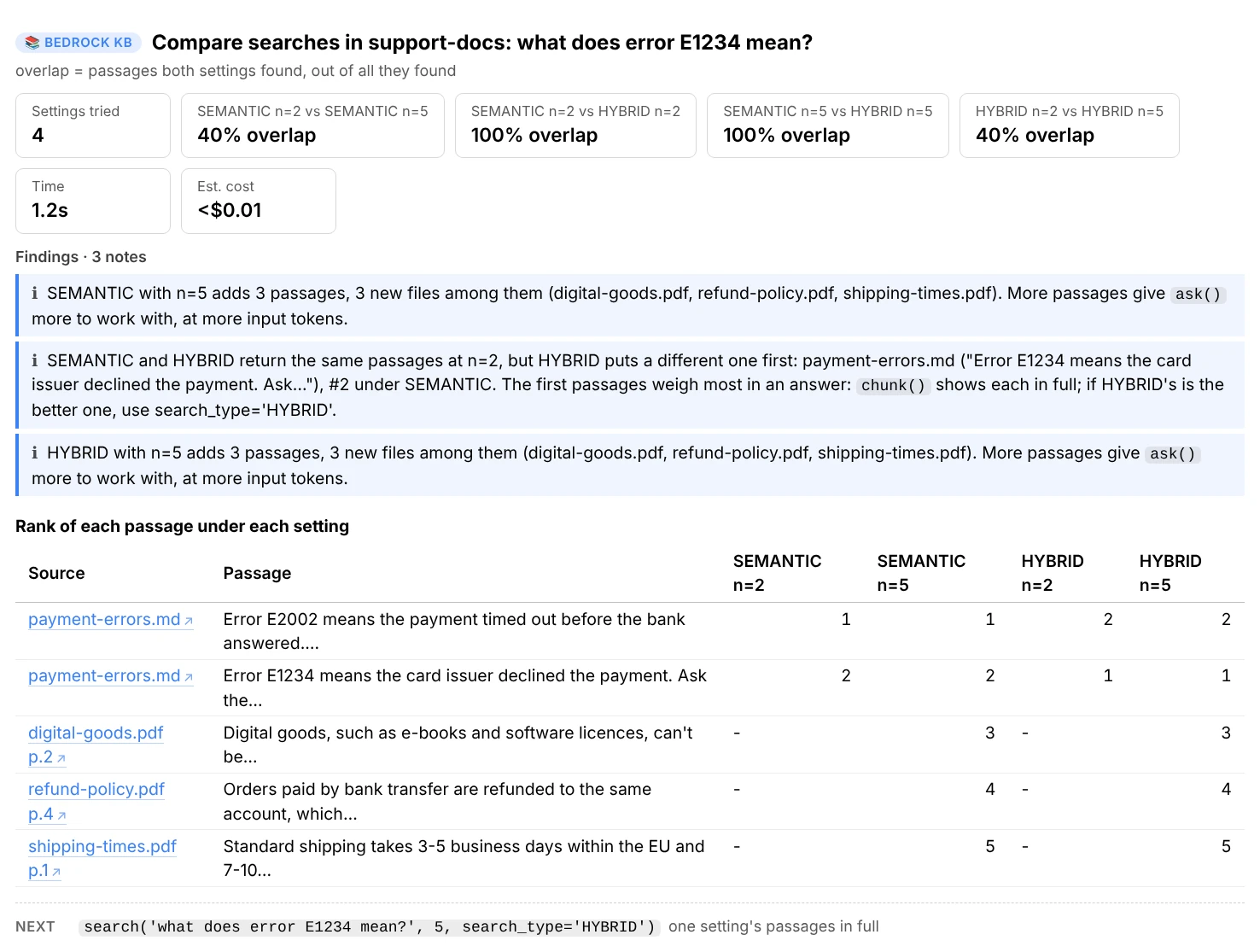
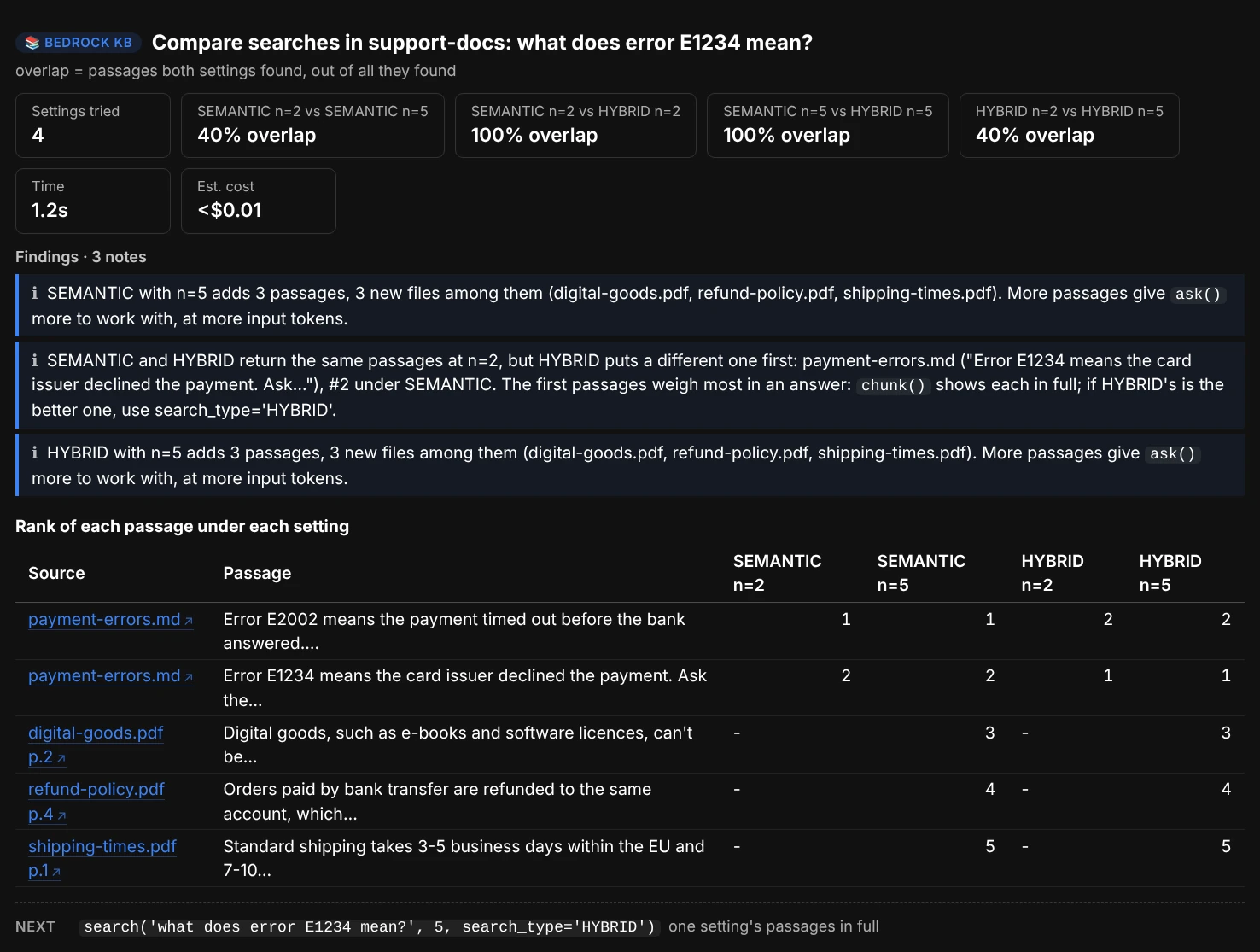
ui.compare("what does error E1234 mean?", n=(2, 5)): both search types find the same passages, but only HYBRID puts the one with the exact error code first.
How often retrieval finds the right file
evaluate() takes test questions with the source each one should find (part of its file name, URI or text) and reports the hit rate (the share of questions whose source came up in the top n) and the MRR (mean reciprocal rank: 1.00 means always first, 0.50 second on average). Each question shows where its source ranked, or “missed”, and what came up first instead. It only retrieves, so it costs a question embedding per question.
cases = [
    ("How long do refunds take?", "refund-policy.pdf"),
    ("How do I reset my password?", "account-faq"),
    ("Can EU customers return an order?", "eu-returns.pdf"),
]
ui.evaluate(cases)
ui.evaluate(cases, n=10, search_type="HYBRID")          # did that help?
ui.evaluate(df)                                        # or a DataFrame with question and expected columns
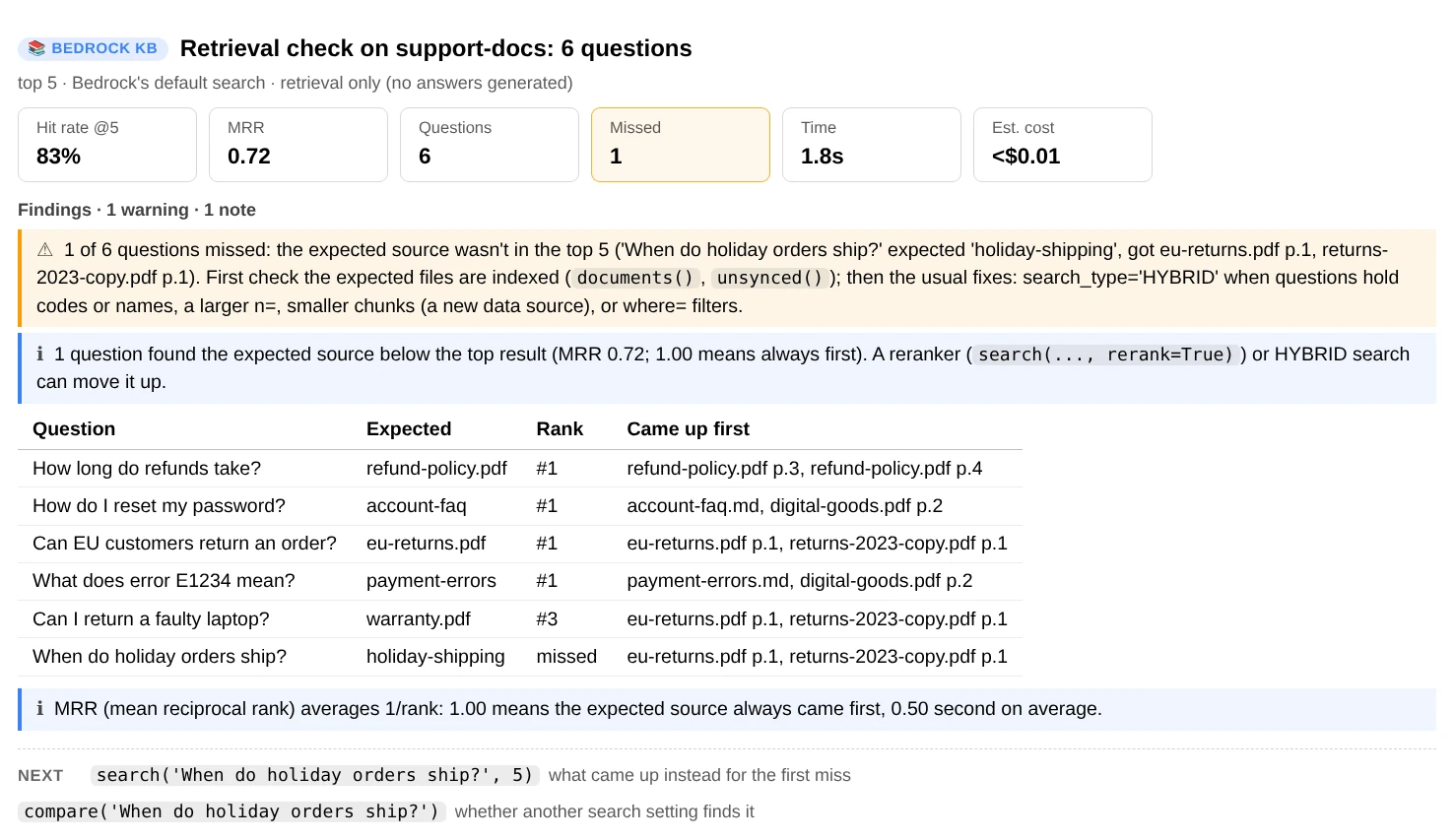
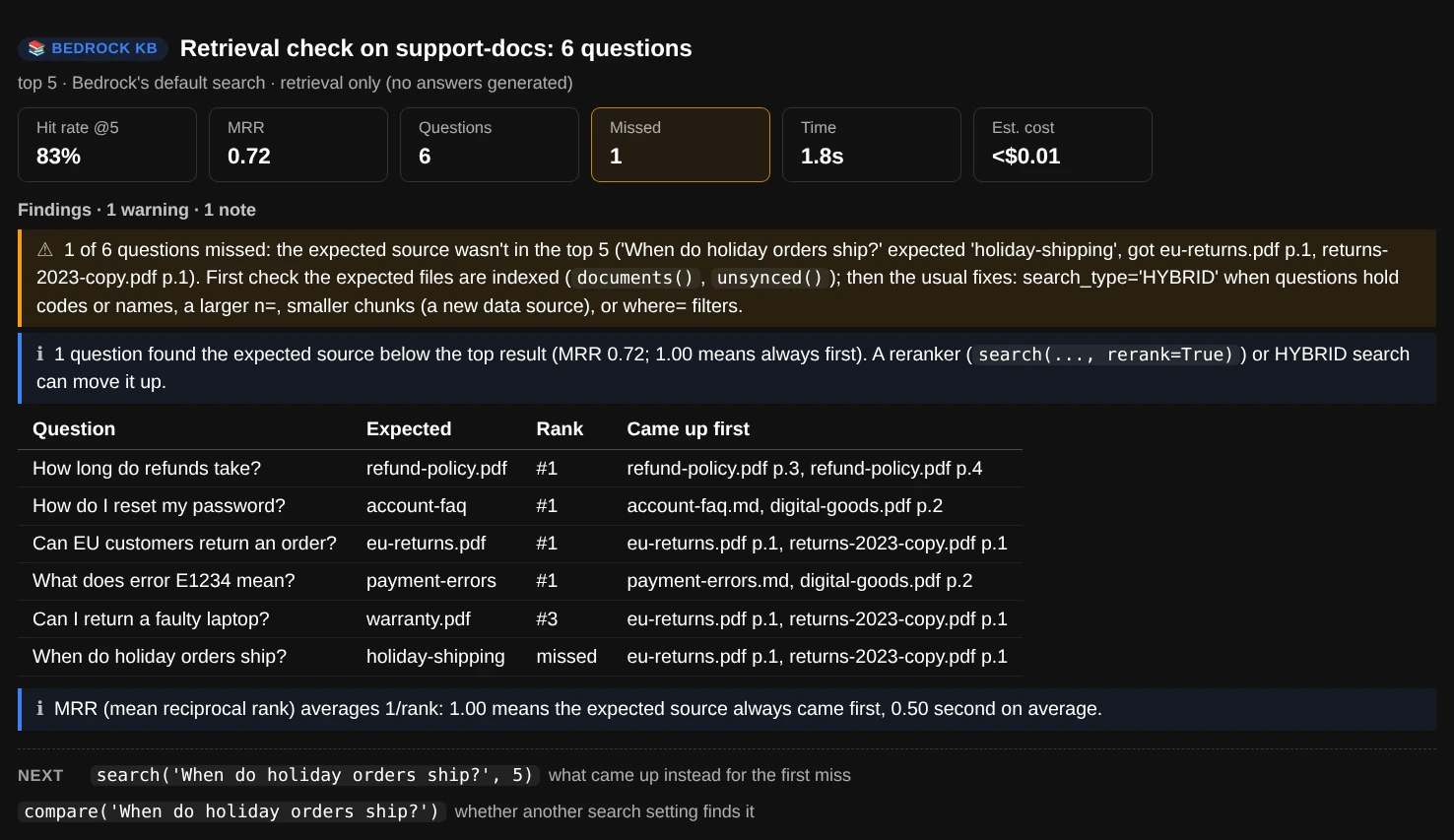
ui.evaluate(cases): the miss is holiday-shipping.md, which was added after the last sync. The unsynced() screenshot above shows it.
Findings list the questions that missed, a file that keeps coming up first instead, and the usual fixes: search_type="HYBRID" for codes and names, a larger n=, smaller chunks (a new data source), or where= filters.
Use the data in Python
Every report has a data version on ui.core (a BedrockKBAnalyzer) that returns dataclasses and DataFrames instead of printing. Its methods take the knowledge base first.
kb = ui.core

info = kb.describe("support-docs")                # KnowledgeBaseInfo: settings, data sources, last syncs, tags
info.data_sources[0].chunking                     # chunkingConfiguration, as AWS returns it
kb.ingestion_jobs("support-docs", n=20)           # [IngestionJob], newest first, with failure reasons
docs, summary = kb.documents("support-docs", status="FAILED")

r = kb.retrieve("support-docs", "refund window", n=10, where={"team": "billing"})   # Retrieval
r.passages[0].text, r.passages[0].source, r.passages[0].metadata
df = r.to_df()                                    # one row per passage
r = kb.retrieve("support-docs", "refund window", data_source="faq")   # r.data_sources: {ID: name}
kb.data_sources("support-docs")                   # [DataSourceInfo]: ID, name, status

a = kb.ask("support-docs", "How long do refunds take?")   # Answer
a.text, a.citations, a.sources, a.grounded_share

# Generate from your own passages, with your own prompt, on any model (Converse, exact tokens)
a = kb.generate("refund window?", r.passages, model="opus", prompt=MY_PROMPT)
a = kb.generate("refund window?", ["a chunk of text", "another chunk"])
a.input_tokens, a.output_tokens

report = kb.evaluate("support-docs", cases)       # EvalReport
report.hit_rate, report.mrr, report.to_df()

inv = kb.file_inventory("support-docs")           # FileInventory: every file, KBFile.state and why (KBFile.note)
inv.counts(), inv.to_df()                         # files per state; one row per file
f = "s3://support-docs-bucket/policies/refund-policy.pdf"
chunks = kb.document_chunks("support-docs", f)    # DocumentChunks: its chunks in document order
chunks.chunks, chunks.stats.overlaps, chunks.stats.coverage
kb.metadata_file(f)                               # MetadataFile: the .metadata.json's attributes and problems
kb.probe_file("support-docs", f, "refund window")   # FileProbe: its passages, and .rank across the knowledge base
The analysis functions don't call AWS, so they work on responses and passages you already have: parse_retrieve, parse_rag, parse_converse, parse_knowledge_base, parse_data_source, describe_chunking, describe_parsing, describe_vector_store, build_filter, data_source_filter, with_data_sources, describe_sources, build_prompt, parse_citation_markers, best_snippet, question_terms, retrieval_metrics, match_expected, compare_retrievals, changed_since, generation_cost, vector_store_monthly_cost, query_cost, the file functions (inventory_files, file_state, skip_reason, sync_needed, parse_metadata_file, chunk_overlap, place_chunks, order_chunks, chunk_stats, file_steps, find_files, sort_files, parse_file_state), and the findings (kb_findings, sync_findings, retrieval_findings, answer_findings, eval_findings, inventory_findings, file_findings, probe_findings).
Cost
-
The idle vector store
A classic OpenSearch Serverless vector collection bills at least 2 OCUs around the clock, about $350/month at us-east-1 list prices, even with no searches. Collections sharing a KMS key share those OCUs; dev-test collections bill half, and NextGen collections scale to zero.
-
Answers
Priced per million input and output tokens by model (
MODEL_PRICES, andGLOBAL_MODEL_PRICESfor the cheaperglobal.profiles). With the default engine the tokens are an estimate;engine="converse"reports exact counts. A model not in the table shows its cost as unknown. -
Searches
A search embeds the question (a fraction of a cent) and, with
rerank=, pays for reranking (about $2 per 1,000 searches for Cohere Rerank 3.5, $1 for Amazon Rerank).compareandevaluateonly search. Opening a file in the explorer (orfile()) is one search, asking it a question two. -
Listing stops early
documents()reads at most 10,000 documents andunsynced()lists at most 100,000 objects;files()and the explorer read 10,000 documents and 10,000 S3 files per data source. A file shows at most 100 chunks, the most one search returns. They all say when they stopped.
Costs are estimates at us-east-1 list prices, read from the Bedrock and OpenSearch pricing pages on 2026-09-25 and checked against the AWS Price List API on 2026-09-27 (BEDROCK_PRICES, MODEL_PRICES and GLOBAL_MODEL_PRICES), and every report says whether it used list prices or yours. For another region or a negotiated price, pass your own:
ui = BedrockKBView(BedrockKBAnalyzer(
    prices={"opensearch_ocu_hour": 0.26, "opensearch_min_ocus": 1},
    model_prices={"claude-sonnet-5": (2.00, 10.00)},    # $ per 1M input and output tokens
))
Permissions
Everything is read-only. Anything the notebook's role can't read shows up as a note (or a ? on a card) instead of an error, so you can start with less and add what you need. This policy covers every command:
{
  "Version": "2012-10-17",
  "Statement": [
    {
      "Sid": "ReadKnowledgeBases",
      "Effect": "Allow",
      "Action": [
        "bedrock:ListKnowledgeBases", "bedrock:GetKnowledgeBase", "bedrock:ListDataSources",
        "bedrock:GetDataSource", "bedrock:ListIngestionJobs", "bedrock:GetIngestionJob",
        "bedrock:ListKnowledgeBaseDocuments", "bedrock:GetKnowledgeBaseDocuments", "bedrock:ListTagsForResource",
        "bedrock:Retrieve", "bedrock:RetrieveAndGenerate"
      ],
      "Resource": "*"
    },
    {
      "Sid": "ListModels",
      "Effect": "Allow",
      "Action": ["bedrock:ListFoundationModels", "bedrock:ListInferenceProfiles"],
      "Resource": "*"
    },
    {
      "Sid": "GenerateAnswers",
      "Effect": "Allow",
      "Action": "bedrock:InvokeModel",
      "Resource": ["arn:aws:bedrock:*::foundation-model/*", "arn:aws:bedrock:*:*:inference-profile/*"]
    },
    {
      "Sid": "ListSourceBuckets",
      "Effect": "Allow",
      "Action": "s3:ListBucket",
      "Resource": "arn:aws:s3:::support-docs-bucket"
    },
    {
      "Sid": "ReadSourceFiles",
      "Effect": "Allow",
      "Action": "s3:GetObject",
      "Resource": "arn:aws:s3:::support-docs-bucket/*"
    }
  ]
}
| Permission | Used by |
|---|---|
bedrock:ListKnowledgeBases, bedrock:GetKnowledgeBase |
kbs, kb_info, and finding a knowledge base by name |
bedrock:ListDataSources, bedrock:GetDataSource |
kb_info, syncs, documents, unsynced, files, file, explore; ListDataSources also for data_source= by name, and to name the data sources in search and ask |
bedrock:ListIngestionJobs, bedrock:GetIngestionJob |
kbs, kb_info, syncs, unsynced, files, file, explore |
bedrock:ListKnowledgeBaseDocuments |
documents, files, file, search_file, explore |
bedrock:GetKnowledgeBaseDocuments |
file and explore, for a file past the first 10,000 of Bedrock's list |
bedrock:ListTagsForResource |
kb_info |
bedrock:Retrieve |
search, compare, evaluate, ask(engine="converse"), and a file's chunks and questions in file, search_file and explore |
bedrock:RetrieveAndGenerate and bedrock:InvokeModel |
ask, follow_up |
bedrock:InvokeModel |
ask(engine="converse"), core.generate |
bedrock:ListFoundationModels, bedrock:ListInferenceProfiles |
models, and turning model="sonnet" into an ID |
s3:ListBucket on the data source's bucket |
unsynced, files, file, search_file, explore |
s3:GetObject on the data source's files |
file and explore read a file's .metadata.json, and a .txt or .md file's text to place its chunks in it. Opening a file from its link (link, and the file names in reports) uses it too, in your browser |
A model also has to be enabled for the account under Model access in the Bedrock console. To scope the policy down, replace * in the first statement with your knowledge bases' ARNs (ListKnowledgeBases itself needs *).
Troubleshooting
“No knowledge base 'x' in us-east-1”, or “knowledge base not found”
Knowledge bases are regional: the notebook's region may not be the knowledge base's. Use BedrockKBView(BedrockKBAnalyzer(region="us-west-2")). The note lists the names it did find; names match in any case.
“Which knowledge base? There are 3 in us-east-1 …”
There's more than one and no default. Pass kb="support-docs" to the command, or set it once with ui.use("support-docs").
“AccessDeniedException: You don't have access to the model …”
The model isn't enabled for the account. Enable it in the Bedrock console under Model access, or pick another from ui.models(). If the message says “not authorized to perform: bedrock:InvokeModel”, the notebook's role needs that permission instead (see Permissions).
“This model needs an inference profile”
Some models can only be called through a cross-region inference profile. The note names the one to pass, such as model="us.anthropic.claude-opus-5"; ui.models() shows it for every model.
“This vector store only supports SEMANTIC search”
Hybrid search (meaning and keywords) needs a store that keeps the text searchable, such as OpenSearch, Aurora PostgreSQL or MongoDB Atlas. Drop search_type="HYBRID".
A search returns nothing
Check ui.syncs() (was the data source ever synced?) and ui.documents() (did the files index?). With where=, remember that metadata values are typed and that filtering needs a .metadata.json file next to each file, followed by a sync.
The answer is “Sorry, I am unable to assist you with this request.”
That's RetrieveAndGenerate's reply when the passages it retrieved don't answer the question. Run ui.search() on the same question to see what came back, then try a larger n=, search_type="HYBRID", or a different wording.
Tokens and cost say “estimate”
RetrieveAndGenerate doesn't report token counts, so they're estimated from characters. engine="converse" reports exact counts.
A follow-up says the session expired
Bedrock ends RetrieveAndGenerate sessions after a while. The tool starts a new one and says so; that answer doesn't know the earlier questions, so ask the full question again if it needs them.
A file's link opens “AccessDenied” or “Request has expired”
The link is signed with the notebook's credentials, so it opens only if they may read the file (s3:GetObject on the bucket, and kms:Decrypt when the bucket is encrypted with a KMS key), and only for an hour or until those credentials expire, whichever comes first. Run the cell again, or link(n), for a fresh link; link(n, expires=86400) lasts a day.
explore() shows a report instead of the window
The window needs Jupyter and ipywidgets. SageMaker has both; elsewhere, %pip install ipywidgets, then restart the kernel and reload the browser tab. In a terminal or a script, explore() shows the same as reports: files(), file() and search_file().
A file says “Not checked”
Bedrock's document list was read up to 10,000 documents per data source, and the file came after. Open it: its own record is looked up then (bedrock:GetKnowledgeBaseDocuments). To read every record at once, ui.core.file_inventory("support-docs", limit=None).
A file's page says “passages of other files came back”
Its chunks are read with a search limited to the file (a filter on x-amz-bedrock-kb-source-uri). A vector store that ignores the filter returns other files' passages too: they're counted and left out, but the chunks shown may not be all of the file's.
The explorer window went blank after I reopened the notebook
Widgets live in the running kernel, so a saved notebook doesn't keep the window. Run the cell again.
The report lost its formatting after I reopened the notebook
JupyterLab strips the report's styles from saved output when a notebook is reopened. Run the cell again to get the formatted report back.
Command reference
Every BedrockKBView command. ui.help() prints the same list grouped by task, and ui.help("ask") shows one command's full description.
| Command | What it shows |
|---|---|
explore(kb=None, file=None, height=None) |
The explorer window: every file and how it was indexed, syncs, search and settings, by clicking |
use(kb) |
Sets the knowledge base later commands use |
kbs() |
Every knowledge base in the region: status, type, vector store, embedding model, sources, documents, last sync, idle cost, warnings |
kb_info(kb=None) |
Settings in plain English, data sources, recent syncs, findings, cost and tags |
syncs(kb=None, data_source=None, n=10) |
Sync history with counts and why syncs failed, and the command to sync again |
documents(kb=None, data_source=None, status=None, n=50) |
Documents by status, the ones that aren't indexed with the reason |
unsynced(kb=None, data_source=None) |
S3 files added or changed since the last successful sync |
files(kb=None, data_source=None, status=None, match=None, n=50) |
Every file next to Bedrock's record of it: failed, changed, not synced, skipped, deleted; problems first, with the sync commands |
file(path, kb=None) |
How one file was indexed: each step, its chunks in document order, its metadata file, and what to fix |
search_file(path, question, kb=None, n=10) |
Whether a question finds a file, and where it ranks among the whole knowledge base's passages |
search(question, n=5, kb=None, data_source=None, where=None, search_type=None, rerank=None) |
Ranked passages with scores, source and page, highlighted words, metadata and findings |
chunk(rank=1) |
The full text and metadata of a result from the last search or ask, and a link to its file |
link(source=1, expires=3600) |
A link that opens a source's file (or any s3:// path) in a new browser tab |
ask(question, kb=None, data_source=None, n=5, where=None, search_type=None, model=None, engine="kb", prompt=None, temperature=None, max_tokens=None) |
The answer with [1][2] citations, grounded share, sources, model, tokens, cost and findings |
follow_up(question, data_source=None) |
The next question in the same session or conversation; data_source= moves it to another data source |
compare(question, kb=None, n=(5, 10), search_types=("SEMANTIC", "HYBRID"), where=None, data_source=None) |
Each passage's rank under each search setting, overlap and findings |
evaluate(cases, kb=None, n=5, search_type=None, where=None, data_source=None) |
Retrieval hit rate and MRR on test questions |
models(match=None) |
Models for ask(): the ID to pass, how it's called, and its price |
help(command=None) |
This list, grouped by task; help("name") shows one command in full |